Solution | Port Block Allocation (PBA) is a Network Address Translation(NAT) type. In FortiGate, PBA is used to configure a Source NAT IP Pool. 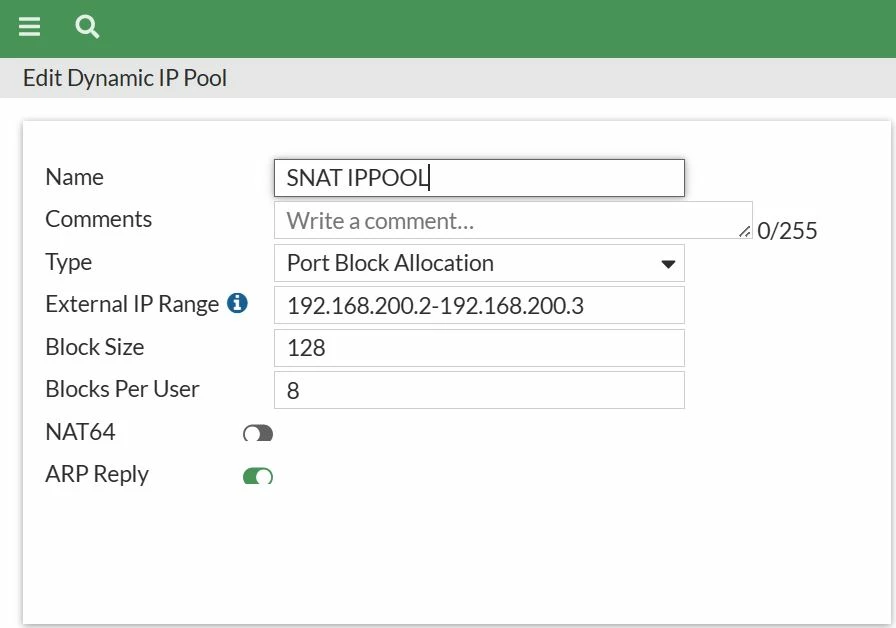 The block size defines the number of ports in each allocation, while the blocks per user determine the maximum number of ports that can be assigned to a single IP address. The minimum allowed block size is 64, and it can go up to 4096. PBA calculations: Total number of available ports per user 128*8 = 1024 Total number of internal user supported per external IP = Total ports that can be allocated per external IP ( 60418 )/ Total available ports per user(1024)= 59 With the above settings, each external IP can support 59 internal IPs, with each internal IP receiving 8 blocks of 128 ports each. When a client sends the first packet, the NAT external IP is allocated based on availability. The FortiOS kernel NAT processes PBA IP POOL range sequentially and selects the first available IP from the external range. That means if 192.168.200.2 has sufficient ports available to allocate a block, then it will be used as an external IP; otherwise, a block will be allocated from the next available external IP address. Example: In a production environment, multiple internal IPs receive port blocks from the first available external IP. With a block size of 128, a single external IP can handle up to 472 block allocations. Since multiple internal IPs are requesting allocations, if an internal IP cannot receive its full allocation from a single external IP because it has already assigned all 472 blocks, the remaining allocation is obtained from the next available external IP. Note: Not all blocks are allocated at once. Once the client exhausts the ports in its assigned block, a new block will be allocated for any subsequent session. If a block is not available within the same external IP, it will be allocated from the next available IP. A port block is not freed unless all the connections from the block are removed from the firewall. PBA timeout value : Even when there are no active sessions, the PBA block may retain to the same subscriber until the configured pba-timeout expires, provided the resources (PBA's) are available for other subscribers. However, if PBA resources are required by another subscriber, FortiGate can reclaim and reallocate an idle PBA block before the timeout expires, provided that there are no active sessions using the block.
Therefore, the pba-timeout defines the maximum idle-block retention period; it does not prevent FortiGate from reclaiming an idle PBA block when additional resources are required.
As a result, the PBA deallocation message will appear when either:
The PBA block's timer expires after the configured pba-timeout period, provided there are no active sessions associated with the block; or
FortiGate reclaims an idle PBA block before the timeout expires because the PBA resources are required by other subscribers.
In summary, an unused PBA block can be deallocated either through timeout expiration or through resource reclamation, depending on resource availability and demand. Assigning external IPs and ports using a round-robin algorithm is not possible.
Example:
diagnose firewall ippool list pba


user 192.168.203.11: 192.168.200.2 25597-29692, idx=5, use=9056
user 192.168.203.6: 192.168.200.2 5117-9212, idx=0, use=8995
user 192.168.203.7: 192.168.200.2 9213-13308, idx=1, use=9040
user 192.168.203.8: 192.168.200.2 13309-17404, idx=2, use=9083
user 192.168.203.9: 192.168.200.2 17405-21500, idx=3, use=9023
user 192.168.203.10: 192.168.200.2 21501-25596, idx=4, use=9043
user 192.168.203.12: 192.168.200.2 29693-33788, idx=6, use=9025
user 192.168.203.13: 192.168.200.2 33789-37884, idx=7, use=9006
user 192.168.203.14: 192.168.200.2 37885-41980, idx=8, use=9069
user 192.168.203.15: 192.168.200.2 41981-46076, idx=9, use=9034
user 192.168.203.13: 192.168.200.2 46077-50172, idx=10, use=9031
user 192.168.203.14: 192.168.200.2 50173-54268, idx=11, use=9031
user 192.168.203.6: 192.168.200.2 54269-58364, idx=12, use=8987
user 192.168.203.7: 192.168.200.2 58365-62460, idx=13, use=8882
user 192.168.203.12: 192.168.200.3 5117-9212, idx=0, use=8995
user 192.168.203.8: 192.168.200.3 9213-13308, idx=1, use=8879
user 192.168.203.11: 192.168.200.3 13309-17404, idx=2, use=8983
user 192.168.203.9: 192.168.200.3 17405-21500, idx=3, use=9046
user 192.168.203.10: 192.168.200.3 21501-25596, idx=4, use=8897
user 192.168.203.15: 192.168.200.3 25597-29692, idx=5, use=8976
user 192.168.203.15: 192.168.200.3 29693-33788, idx=6, use=6
user 192.168.203.12: 192.168.200.3 33789-37884, idx=7, use=54
user 192.168.203.11: 192.168.200.3 37885-41980, idx=8, use=4
user 192.168.203.14: 192.168.200.3 41981-46076, idx=9, use=46
user 192.168.203.10: 192.168.200.3 46077-50172, idx=10, use=4
user 192.168.203.8: 192.168.200.3 50173-54268, idx=11, use=5
user 192.168.203.7: 192.168.200.3 54269-58364, idx=12, use=4
user 192.168.203.13: 192.168.200.3 58365-62460, idx=13, use=18
diagnose firewall ippool list


ippool SNAT IPPOOL: id=1, block-sz=4096, num-block=8, fixed-port=no, use=14
nat ip-range=192.168.200.2-192.168.200.3 start-port=5117, num-pba-per-ip=14
clients=10, inuse-NAT-IPs=2
total-PBAs=28, inuse-PBAs=28, expiring-PBAs=0, free-PBAs=0.00%
If the client(internal IP) utilizes all ports from all the blocks allocated to it, then PBA port block exhaustion will happen for that client, and a message will be logged into the system event logs with an alert for the PBA Exhaustion. To avoid this situation, it is required to optimize the PBA allocation.
The IP session can also be cleared to fix the pool exhaustion issue: diagnose system session filter src x.x.x.x
diagnose system session clear
Note: Certain applications may require dynamic IP consistency, i.e. traffic from an Internal IP should always leave with the same external NAT IP. However, if the port block allocation is too strict, it will break the consistency, and the internal IP may get NATed with a different external IP from the PBA range. For FortiOS hyperscale, this feature may work differently due to NP7 hardware capabilities. Refer to this link for the Hyperscale versions: Dynamic IP consistency. Note: Before 7.6.1, PBA port allocation always started from 5117, and it was sequential. Starting from 7.6.1, it is possible to randomize the port allocation. This makes it less predictable.
The config firewall central-snat-map command includes a new option:
config firewall central-snat-map
    edit 1
        set port-preserve disable
        set port-random {enable | disable}
    next
end
The config firewall policy command includes a new option:
config firewall policy
    edit 1
        set port-preserve disable
        set port-random {enable | disable}
    next
end
For more details, refer to this document: Support for randomized port selection in IP pool mechanisms. FortiOS Hyperscale has some additional features. Refer to this link for CGNAT in Hyperscale firewalls: Hyperscale and standard FortiOS CGNAT feature comparison. Related documents: |



