This image shows that there is a configuration mismatch under switch-controller.manage-switch. 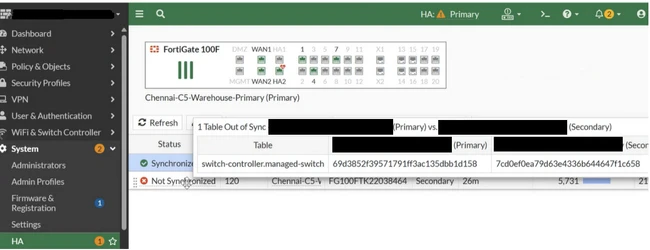 Check the checksum on the primary and secondary for the configuration of the switch controller. To access the secondary FortiGate, see this article: Technical Tip: How to access secondary unit of HA cluster via CLI. Use the following command: config switch-controller managed-switch
show full-configuration
Compare the differences in both configurations using a 'diff checker tool'. If differences are shown in the switch port configuration, the user may be unable to edit it due to an illegal character in the switch name. The legal allowed characters are numbers (0-9), letters (a-z, A-Z), and special characters - and _
node_check_object fail! for switch-id RACK-17.6. In this case, it is advisable to rename the switch or apply the workaround recommended in the article: Technical Tip: Unable to change name or configuration of a managed FortiSwitch from FortiGate GUI or CLI due illegal characters in switch name If differences are shown for Dynamic-capability under switch configuration, then try to re-import the configuration on the secondary device from the primary device. 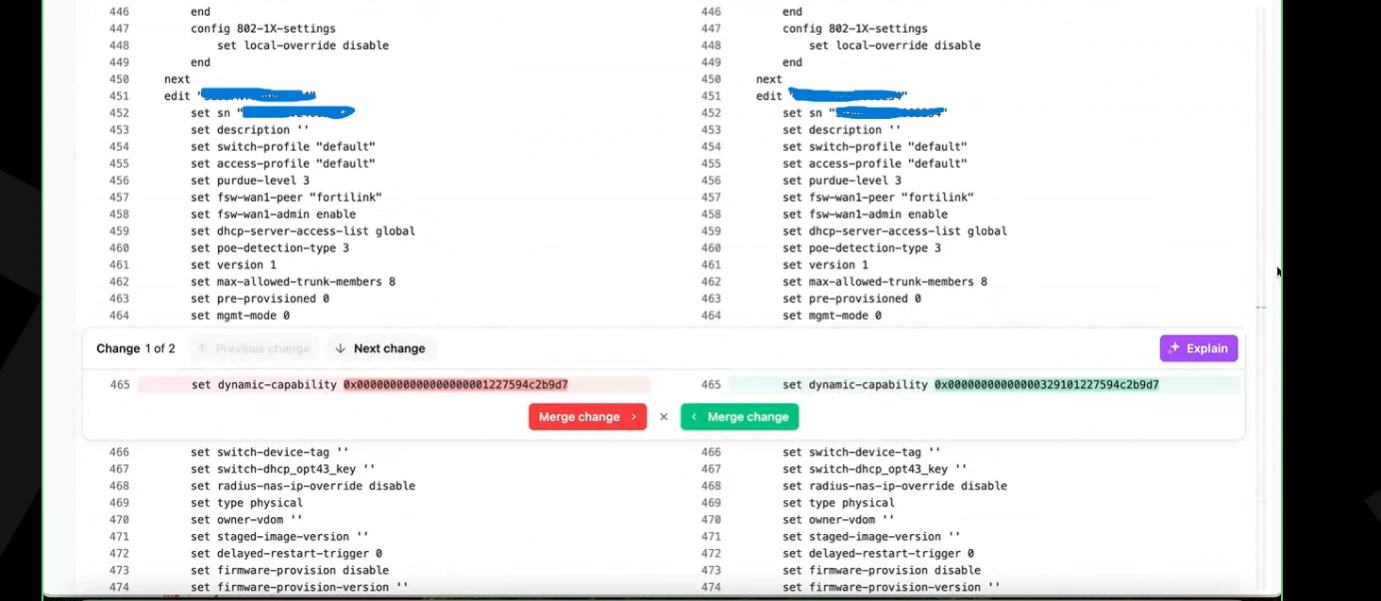
The dynamic-capability option shows what features the switch supports and its non-configurable value.
The value differs for the switch model; it is not possible to change the value.
Refer to the article: Technical Tip: 'dynamic-capability' flag on Managed FortiSwitch. If the issue is still not resolved, contact Fortinet Technical Support. Notes: To address the synchronization issue, carefully examine the dynamic-capability parameter for any discrepancies, as differences in this parameter could be the root cause. Ensure that both systems or components involved have matching values for dynamic-capability, and if inconsistencies are found, update or align them accordingly to restore proper synchronization.
config switch-controller managed-switch
    edit "S248F"
        set name "SW2"
        set fsw-wan1-peer "fortilink"
        set fsw-wan1-admin enable
        set poe-detection-type 2
        set version 1
        set max-allowed-trunk-members 8
        set dynamic-capability 0x0000000000000000000027757dddbff7
Dynamic-capability can cause HA to be out of sync due to a value mismatch. To check the Dynamic-capability values, follow the commands on both devices. On Primary:
FortiGate1 # config switch-controller managed-switch
FortiGate1 (managed-switch) # edit "S248F"
FortiGate1 (S248F) # get
description : \
switch-profile : default \
access-profile : default \
purdue-level : 3 \
fsw-wan1-peer : fortilink \
fsw-wan1-admin : enable \
dhcp-server-access-list: global \
poe-detection-type : 3\
directly-connected : 0\
version : 1\
max-allowed-trunk-members: 8\
pre-provisioned : 1\
l3-discovered : 0\
mgmt-mode : 0\
tunnel-discovered : 0\
tdr-supported : yes \
dynamic-capability : igmp-snooping,dhcp-snooping,qos,sticky-mac,per-port-storm-control,lldp-vlan-assignment,qos-global-drop-policy,bounce-port,lldpmed,dot1x,access-vlan,bulk-stage,stp-root-guard,port-mac-limit,led-diag-flash,igmp-snoop-proxy,aggregator-mode,self-sign,dot1x-auth-server-timeout,nac,lan-segment,lan-segment-lite,pd-capable \
On Secondary:
FortiGate2 # config switch-controller managed-switch
FortiGate2 (managed-switch) # edit "S248F"
FortiGate2 (S248F) # get
description : \
switch-profile : default \
access-profile : default \
purdue-level : 3 \
fsw-wan1-peer : fortilink \
fsw-wan1-admin : enable \
dhcp-server-access-list: global \
poe-detection-type : 3\
directly-connected : 0\
version : 1\
max-allowed-trunk-members: 8\
pre-provisioned : 1\
l3-discovered : 0\
mgmt-mode : 0\
tunnel-discovered : 0\
tdr-supported : yes \
dynamic-capability : igmp-snooping,dhcp-snooping,qos,sticky-mac,per-port-storm-control,lldp-vlan-assignment,qos-global-drop-policy,bounce-port,lldpmed,dot1x,access-vlan,bulk-stage,bpdu-guard,stp-root-guard,port-mac-limit,led-diag-flash,igmp-snoop-proxy,aggregator-mode,self-sign,dot1x-auth-server-timeout,nac,lan-segment,lan-segment-lite,pd-capable \
In the above example, HA is out of sync due to a mismatch in the value, which is highlighted in the outputs. execute ha synchronize stop
diagnose debug reset
diagnose debug application hatalk -1
diagnose debug application hasync -1
diagnose debug console timestamp enable
diagnose debug enable
execute ha synchronize start
To stop debugging:
diagnose debug disable
diagnose debug reset
Related article: Troubleshooting Tip: How to troubleshoot HA synchronization issue using GUI and CLI on FortiGate/FortiProxy Technical Tip: How to check cluster checksum and recalculate checksum on FortiOS |