


FortiGate VM GUI inaccessible after license expiration
Description
How an expired license on a FortiGate virtual machine can lead to the loss of Graphical User Interface (GUI) access while Secure Shell (SSH) access remains functional.
Scope
FortiGate.
Solution
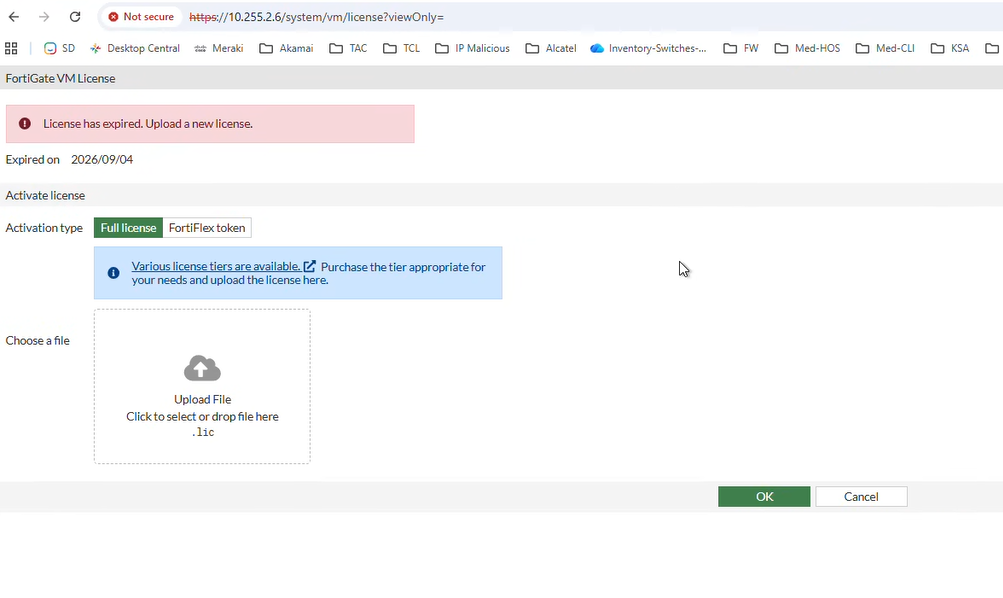
When a FortiGate virtual machine license expires, the system may restrict access to the Graphical User Interface (GUI). In this state, the device continues to pass traffic and allows management via the Command Line Interface (CLI) through Secure Shell (SSH), but the web-based management console becomes inaccessible.
To identify if an expired license is the cause of the GUI failure.
Follow these steps:
Establish a connection to the FortiGate via SSH:
Run the following command to check the system status and license expiration date:
get system status
Logs:
Version: FortiGate-VM64-OPC v7.4.12,build2902,260505 (GA.M)
First GA patch build date: 230509
Current Security Level: High
Firmware Signature: certified
Virus-DB: 1.00000(2018-04-09 18:07)
Extended DB: 1.00000(2018-04-09 18:07)
Extreme DB: 1.00000(2018-04-09 18:07)
AV AI/ML Model: 0.00000(2001-01-01 00:00)
IPS-DB: 6.00741(2015-12-01 02:30)
IPS-ETDB: 6.00741(2015-12-01 02:30)
APP-DB: 6.00741(2015-12-01 02:30)
Proxy-IPS-DB: 6.00741(2015-12-01 02:30)
Proxy-IPS-ETDB: 6.00741(2015-12-01 02:30)
Proxy-APP-DB: 6.00741(2015-12-01 02:30)
FMWP-DB: 26.00090(2026-09-01 08:02)
IPS Malicious URL Database: 1.00001(2015-01-01 01:01)
IoT-Detect: 0.00000(2022-08-17 17:31)
OT-Detect-DB: 0.00000(2001-01-01 00:00)
OT-Patch-DB: 0.00000(2001-01-01 00:00)
OT-Threat-DB: 6.00741(2015-12-01 02:30)
IPS-Engine: 7.00604(2026-04-13 22:28)
Serial-Number: FGVMXXXXXXXXXX
License Status: Expired
License Expiration Date: 2026-09-04
VM Resources: 2 CPU/2 allowed, 60391 MB RAM
Log hard disk: Not available
Hostname: FGT_OCI_PRI
Review the output for the 'License Status' and 'License Expiration Date' fields. If the status shows 'Expired', the GUI is disabled due to the lack of a valid license. To restore GUI access, renew the license for the affected FortiGate units. Once a valid license is applied, the GUI service will be restored automatically.
If, upon renewal, the license is still not reflected, run the commands below to attempt to refresh the license details with our FortiGuard servers.
Verify FortiGuard connectivity
Check connectivity between the FortiGate VM and FortiGuard servers. DNS resolution, routing, or outbound connectivity issues may prevent the device from retrieving updated license information.
execute ping service.fortiguard.net
diagnose debug rating
Verify HTTPS management access
If the license status shows valid but GUI access remains unavailable, verify whether HTTPS administrative access is enabled on the management interface and whether the required management port is reachable.
show system interface
show system global
Note:
Always verify if high encryption support is available; otherwise, the TLS communication might fail.
The algorithms might not be supported if the device has low-encryption license support.
execute update-now
For an air-gapped environment, follow the steps provided in the following article to upload an offline license:
