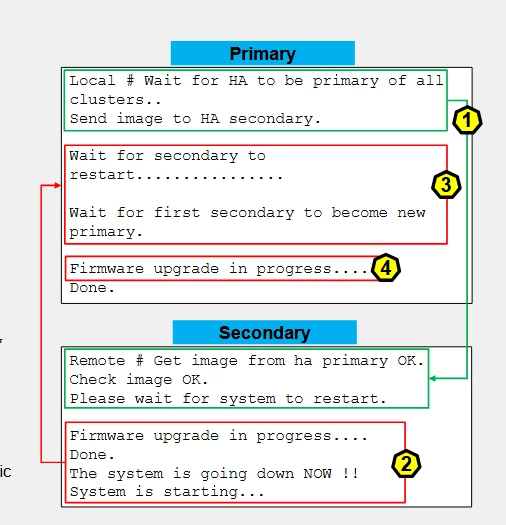
The following is the general process that occurs when performing a firmware upgrade on an HA cluster with uninterruptible-upgrade enabled: The administrator uploads the firmware image to the Primary device. The Primary node pushes the image to the other members of the HA cluster (i.e., the Secondary units). The Secondary units upgrade their firmware and reboot as part of the process. After the upgrades are completed, the Secondary units send the Primary an acknowledgment that the upgrade has been completed. After receiving acknowledgement, the Primary node starts the upgrade and reboots. During this reboot, one of the Secondary units will assume the HA Primary role. Traffic will failover from the former HA Primary to the new HA Primary.
Note: To understand which sessions are transferred from the primary unit to the new active unit during an HA failover, refer to the article: Technical Tip: HA session failover (session pickup). After the upgrade process is completed, the old Primary will rejoin the cluster. Depending on the HA settings/status (e.g., cluster uptime, whether or not HA override is enabled, etc.), the original Primary may or may not resume as the HA Primary for the cluster.
 Run show full system ha to see if uninterruptible-upgrade is enabled: show full system ha
[...]
set uninterruptible-upgrade enable
[...]
For more information regarding the HA election process, see Technical Tip: FortiGate HA Primary unit selection process when override is disabled vs enabled. Note: In FortiOS 7.4.1 and onward, uninterruptible-upgrade has been changed to upgrade-mode, and additional features have been added: config system ha
set upgrade-mode {simultaneous | uninterruptible | local-only | secondary-only}
end
The default setting for upgrade-mode is uninterruptible, which follows the same behavior as the previous set uninterruptible-upgrade enable. Similarly, the behavior of set uninterruptible-upgrade disable is now mapped to set upgrade-mode simultaneous.
For chassis-based FortiGate models like 7k, the default upgrade-mode is simultaneous rather than uninterruptible.
show full system ha
[....]
set upgrade-mode simultaneous
[...]
For more information on this expanded setting, see the following:
Additionally, it is always recommended to connect the console port to each device (if it is in an HA cluster) and capture the console output for future investigation (like any error message, Flash/Firmware, or configuration missing issues). The article explains how to connect the console port to FortiGate: Technical Tip: How to connect to the FortiGate and FortiAP console port The following are debug examples that show, in stages, how a FortiGate HA cluster negotiates firmware upgrades and status changes: diagnose debug console timestamp enable
diagnose debug application hatalk -1
diagnose debug application hasync -1
diagnose debug enable
Command to disable the debugging: diagnose debug disable
Stage 1: Upgrade starts. Primary: 2023-02-22 12:33:03 <hatalk> entering hatalk_upgrade_timer_func: uprade_state=1(ENTER), daemon_bits=0x00000000
2023-02-22 12:33:03 <hatalk> leaving hatalk_upgrade_timer_func: uprade_state=2(PRIMARY), daemon_bits=0x00000000
2023-02-22 12:33:03 Send image to HA secondary.
2023-02-22 12:33:06 <hatalk> leaving hatalk_upgrade_timer_func: uprade_state=3(SENT-IMAGE), daemon_bits=0x00000000
Secondary: 2023-02-22 12:33:04 Get image from ha primary OK.
2023-02-22 12:33:04 Verifying the integrity of the firmware image...
2023-02-22 12:33:05 Check image OK.
2023-02-22 12:33:05 Please wait for system to restart.
2023-02-22 12:33:13
Firmware upgrade in progress ...
Done.
The system is going down NOW !!
Stage 2: After the Secondary FortiGate has completed its reboot/firmware upgrade, the HA cluster will failover the HA Primary role so that the Primary FortiGate can undergo the upgrade. Primary: 2023-02-22 12:33:12 <hatalk> leaving hatalk_upgrade_timer_func: uprade_state=4(CHECK-SECONDARY), daemon_bits=0x00000000
2023-02-22 12:34:01 <hatalk> new member 'FGVM020000-----6' is added into group
2023-02-22 12:34:03 <hatalk> entering hatalk_upgrade_timer_func: uprade_state=14(WAIT-DAEMONS), daemon_bits=0x00000170
2023-02-22 12:34:03 <hatalk> check_daemon_wait: ClearPass sync is done, daemon_bits=0x00000070
2023-02-22 12:34:18 <hatalk> entering hatalk_upgrade_timer_func: uprade_state=5(SECONDARY-UP), daemon_bits=0x00000000
2023-02-22 12:34:18 <hatalk> leaving hatalk_upgrade_timer_func: uprade_state=6(RELEASE-UPGRADE-FLAG), daemon_bits=0x00000000
2023-02-22 12:34:19 <hatalk> leaving hatalk_upgrade_timer_func: uprade_state=7(RELEASE-DONE), daemon_bits=0x00000000
2023-02-22 12:34:19 Wait for first secondary to become new primary
2023-02-22 12:34:20 <hatalk> entering hatalk_upgrade_timer_func: uprade_state=8(CHECK-STATE), daemon_bits=0x00000000
2023-02-22 12:34:20 <hatalk> vcluster_0: state changed, 2(work)->3(standby)
2023-02-22 12:34:20 <hatalk> [hatalk_work_as_slave:391] vcluster_0: work_as_secondary
2023-02-22 12:34:21 <hatalk> leaving hatalk_upgrade_timer_func: uprade_state=9(BECOME-SECONDARY), daemon_bits=0x00000000
Secondary: 2023-02-22 12:34:21 <hatalk> vcluster_0: set flag HATALK_VMEMBER_F_CLAIM_AS_PRIMARY
2023-02-22 12:34:21 <hatalk> cfg_changed is set to 1: hatalk_work_as_master
2023-02-22 12:34:21 <hatalk> vcluster_0: update state_change_time, work-as-primary
Primary (after Secondary has assumed the HA Primary role): 2023-02-22 12:34:30
Firmware upgrade in progress ...
Done.
The system is going down NOW !!
Stage 3: Once the Primary completes its own reboot/firmware upgrade, it will rejoin the cluster. The old Primary may resume the role of HA Primary depending on the state of the HA cluster (i.e., cluster uptime differences between HA members, HA priority settings, whether or not Override is enabled on one of the units, etc.). In the following example, the old Primary FortiGate is re-elected to the HA Primary role due to two factors: a) the cluster uptime difference between the two units is less than 5 minutes, and b) the Primary FortiGate has a superior (larger) Priority value set. Secondary: 2023-02-22 12:35:17 <hatalk> vcluster_0: update state_change_time, work-as-secondary
2023-02-22 12:35:17 <hatalk> vcluster_0: unset flag HATALK_VMEMBER_F_CLAIM_AS_PRIMARY
When checking the HA status from the Secondary: get sys ha status
The primary was selected using:
HA Health Status: OK
Model: FortiGate-VM64-KVM
Mode: HA A-P
Group: 11
Debug: 0
Cluster Uptime: 0 days 0:10:20
Cluster state change time: 2023-02-22 12:35:17
<2023/02/22 12:35:17> FGVM020000-----2 is selected as the primary because its override priority is larger than peer member FGVM020000-----6.
<2023/02/22 12:34:29> FGVM020000-----6 is selected as the primary because it's the only member in the cluster.
<2023/02/22 12:34:21> FGVM020000-----6 is selected as the primary because UPGRADE_SECONDARY flag is set on peer member FGVM020000-----2.
<2023/02/22 12:34:00> FGVM020000-----2 is selected as the primary because UPGRADE_PRIMARY flag is unset on peer member FGVM020000-----6.
[...]
Note: This article, Technical Tip: How to read 'diagnose sys ha history read' output during an HA cluster upgrade, gives more clarity on the HA upgrade sequence and shows how to read the failover and primary role changes in the HA history log. | 


