Summary:
When upgrading a FortiGate-60F to FortiOS 7.6.7 (build 3704) by uploading the firmware image through the GUI, the upgrade displays the following message:
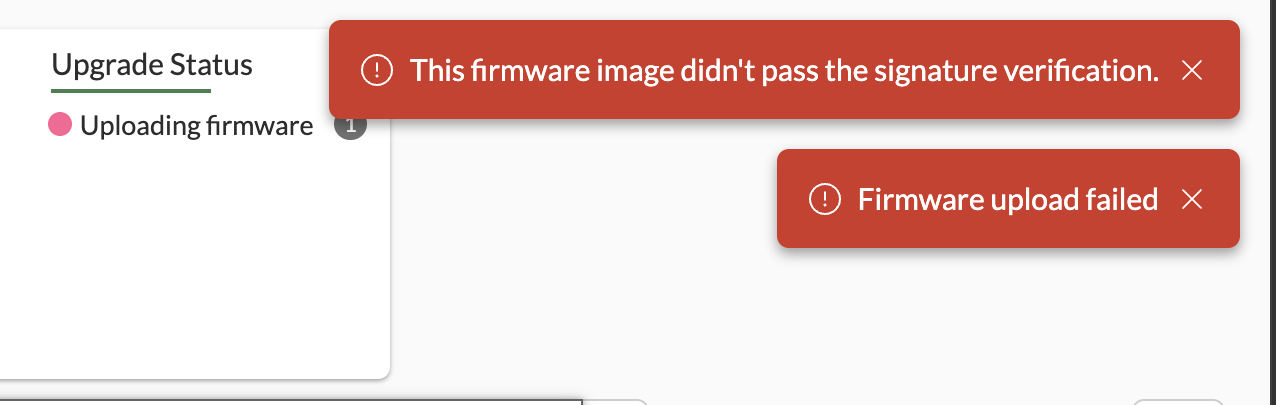
This message indicates Fortinet cannot verify the authenticity of this firmware, the image checksum from the support portal validates, and after acknowledging the warning the upgrade completes successfully. After an upgrade, get system status shows Firmware Signature: certified. The firmware is genuine; the warning is spurious.
Root cause 1:
The defect is in the GUI multipart upload parser, not in the firmware image or the signature itself. In multipart_buffer_read() (fortiweb/modules/ApacheUpload.c:545), which services the firmware upload endpoint POST /api/v2/monitor/firmware/fortigate/upload: When the multipart boundary lies beyond the current read window (start > bytes), the function returned bytes — but the trailing CRLF strip at line 569 fired unconditionally whenever a boundary was present in the buffer (start > 0). Since the returned length did not include the CRLF preceding the boundary, the strip removed 2 bytes of real file data per affected chunk. The truncated image (e.g. 87,003,309 bytes received vs. 87,003,311 bytes actual) then fails ncfg_check_image_signature() ('The new image does not have a valid RSA signature'), raising httpsd API error -586 (or -585 at Security Level High, where the upload is blocked entirely with no confirmation dialog).
The truncation is size-dependent (uploaded file size combined with the multipart boundary length), which is why only certain images — such as the FG60F 7.6.7 build — trigger the failure, while other models (e.g. FG-120G) and other versions (7.6.6) are unaffected.
Affected Versions / Platforms:
Platform: FortiGate-60F (observed; the code defect is in the shared GUI upload path, so other models can be affected when image size + boundary length align). Versions: GUI upgrades targeting 7.6.7 build 3704 (buggy parser present in 7.6.6 build 3652 and earlier 7.x builds as well). Path: GUI firmware upload only. CLI and FortiGuard paths are unaffected.
Workaround:
Any of the following avoids the defective GUI multipart upload path:
Upgrade via CLI: execute restore image (upload/upgrade from CLI). FortiGuard firmware download path: GUI -> System -> Firmware -> Check Update / Download from FortiGuard. The image is downloaded directly to the device and never passes through the multipart parser.
If the warning is already shown, it is safe to acknowledge and continue the installed firmware remains authentic and reports Firmware Signature: certified.
Fix:
Item | Detail |
|---|
Fix | Make the CRLF strip conditional on the boundary actually falling inside the returned read window, return start - 2 when the boundary is beyond the read so the preceding CRLF is left unconsumed. | Commit | ec16dad39a40 (branch origin/dev_gui_bf_1302768_7-x, build 3727).
| ECOs | 317254 (7.x, build 3730), 317255 (8.0/main, build 0231). | Fixed in | 7.6.8 (build 3730) and 8.0.1 (build 0231). |
Verification / Diagnostic Tips:
The httpsd debug shows the following:
fortigate_firmware_upload -> _system_firmware_upgrade -> UPLOADFILE '/tmp/upfile' size=<N-2>
The received size is exactly 2 bytes short of the actual file size, confirming truncation.
After upgrading, get system status shows Firmware Signature: certified, confirming the image itself was never the problem.
Root cause 2:
If the unit is running low on memory, it will throw the same error, "WARNING: This firmware failed signature validation," when you try to upgrade the unit via the GUI or CLI.
Forti60F # exe restore image management-station 07004000FIMG0024204013
Please wait...

Getting image 07004000FIMG0024204013 from Management station...
####################################################################################################
This operation will replace the current firmware version!
Do you want to continue? (y/n)y

Verifying the signature of the firmware image.
Image verification failed!
******WARNING: This firmware failed signature validation.******
Fortinet cannot verify the authenticity of this firmware and therefore
there may be a risk that the firmware contains code unknown to Fortinet.
In short, Fortinet cannot validate the firmware and makes no warranties
or representations concerning the firmware.
Forti60F # diagnose hardware sysinfo conserve
memory conserve mode: off
total RAM: 1917 MB
memory used: 1442 MB 75% of total RAM
memory freeable: 195 MB 10% of total RAM
memory used + freeable threshold extreme: 1860 MB 97% of total RAM
memory used threshold red: 1802 MB 94% of total RAM
memory used threshold green: 1725 MB 90% of total RAM
Affected Versions / Platforms:
Workaround:
Verify the amount of consumed memory.
diagnose hardware sysinfo conserve
If memory consumption is high, check which daemons are using the most memory.
diagnose sys top-mem
For node and ipsengine, restart the daemons using the following commands:
diagnose nodejs process restart
diagnose test app ipsmonitor 99
Retry the firmware upgrade using the GUI or CLI (management-station).
Note: At Security Level High, the truncated upload is rejected outright (API error -585, no dialog); at Low, the warning dialog appears and the upgrade can proceed.
Related articles:
| 


