If the FortiGate cannot update the DDNS IP address, it may be due to packet fragmentation or Maximum Segment Size (MSS) issues when communicating with FortiGuard servers. This often manifests as a 'Failed reading pkg header' error in the debug logs.
Verify the DDNS debugs using the following command:
diagnose debug reset
diagnose debug application ddnscd -1
diagnose debug enable

1790319253: Start to update FortiGuardDDNS (adealquoz34.fortiddns.com)
1790319253: next wait timeout 10 seconds
fgd_ddns_socket()-896: connected to 173.243.138.226:443
[276] __ssl_init: Done
[119] __ssl_cert_ctx_load: Added cert FGT60FTK21000124, root ca Fortinet_CA, idx 0 (default)
[119] __ssl_cert_ctx_load: Added cert FGT60FTK21000124, root ca Fortinet_CA_Backup, idx 1
[843] ssl_ctx_create_new: SSL CTX is created
[870] ssl_new: SSL object is created
ddns_sock_ssl_connect()-750: SSL connecting, ssl opt 0x8
[735] __ssl_info_callback: before SSL initialization
[735] __ssl_info_callback: SSLv3/TLS write client hello
__ddns_ssl_connect()-669: ssl_res=1
[735] __ssl_info_callback: SSLv3/TLS write client hello
[735] __ssl_info_callback: SSLv3/TLS read server hello
[735] __ssl_info_callback: TLSv1.3 read encrypted extensions
[735] __ssl_info_callback: SSLv3/TLS read server certificate request
[735] __ssl_info_callback: SSLv3/TLS read server certificate
[758] __ssl_info_callback: Current cert idx 0, SSL verion 'TLS 1.3'
[770] __ssl_info_callback: Got server cert chain, num 2
[778] __ssl_info_callback: Server root issuer /C=US/ST=California/L=Sunnyvale/O=Fortinet/OU=Certificate Authority/CN=s
upport/emailAddress=support@fortinet.com
[781] __ssl_info_callback: Client root issuer /C=US/ST=California/L=Sunnyvale/O=Fortinet/OU=Certificate Authority/CN=f
ortinet-ca2/emailAddress=support@fortinet.com
[710] __ssl_switch_cert: Update with next cert, idx 1
[735] __ssl_info_callback: TLSv1.3 read server certificate verify
[735] __ssl_info_callback: SSLv3/TLS read finished
[735] __ssl_info_callback: SSLv3/TLS write change cipher spec
[735] __ssl_info_callback: SSLv3/TLS write client certificate
[735] __ssl_info_callback: SSLv3/TLS write certificate verify
[735] __ssl_info_callback: SSLv3/TLS write finished
__ddns_ssl_connect()-669: ssl_res=0
fgd_ddns_fcp_exchange()-1000: Sending FCPC=Protocol=3.4|SerialNumber=FGT60FTK21000124|Firmware=FGT60F-FW-7.04-2902|Com
mand=DDNSSetup
fgd_ssl_recv_fcpr()-613: Failed reading pkg header (0, 64) --------->
[212] __ssl_data_ctx_free: Done
[1123] ssl_free: Done
[204] __ssl_cert_ctx_free: Done
[1133] ssl_ctx_free: Done
[1114] ssl_disconnect: Shutdown
1790319254: Failed on update FortiGuardDDNS (adealquoz34.fortiddns.com), due to internal/config/connect/io err
1790319254: Failed on update FortiGuardDDNS (adealquoz34.fortiddns.com), next try in 60 seconds
Debug explanation:
The SSL/TLS connection is established, and the FortiGate sends the FCPC (FortiGuard Communication Protocol) request, but the response package header cannot be read. This almost always points to a path MTU/packet fragmentation/TCP MSS problem between the FortiGate and the FortiGuard DDNS servers (typically on TCP/443).
Taking a PCAP will give more clarity; as below, the change cipher spec message is unable to pass through the link due to an MTU issue:
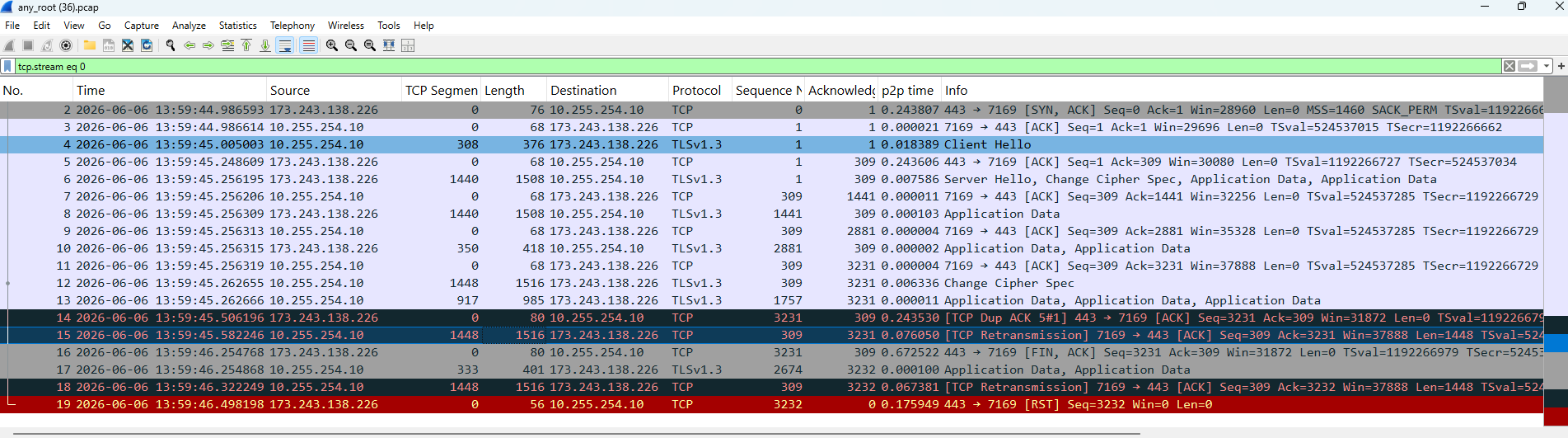
Root cause:
Packet fragmentation or an MTU mismatch on the path to the FortiGuard DDNS servers (commonly 173.243.138.x). Large TCP segments are dropped or arrive incomplete, so the FortiGate cannot parse the packet header (expected length often related to 64 bytes).
This same class of error (Error receiving pkg header, Failed reading pkg header, Received incorrect pkg header) is frequently seen with other FortiGuard services (AV/IPS updates, web filtering rating, etc.) when the path MTU is constrained (PPPoE, VPN overlays, carrier-grade NAT, certain ISP links, etc.).
Collecting a PCAP in this case will also clarify the issue.
Resolution:
Adjust the TCP MSS value on the WAN interface to ensure packets are not fragmented. Run the following commands: The interface MTU on wan1 can also be reduced in the above scenario.
config system interface
    edit "wan1"
        set tcp-mss <optimum_mss_value>
    next
end
To find the optimum MSS/MTU value of the network, do the below ping test from the FortiGate and then adjust the TCP MSS or WAN MTU to match using during non-production hours:
execute ping-options reset
execute ping-options interface "interface_name"
execute ping-options source "interface_ip_address"
execute ping-options data-size <size>
execute ping-options df-bit yes
execute ping <server IP>
For a 1500-byte MTU, 1500-28 (20 bytes=IP header and 8 bytes=ICMP header) = 1472.
If the packet needs to be fragmented but the DF bit is set, the MTU is less than 1500 bytes.
Suppose it is possible to ping with a size of 1400 but not with a size of 1401; this means that the MTU value is 1400+28=1428 bytes.
The solution is either to fix the MTU on the network device or to set the TCP MSS in the intermediate device firewall policy to 1428-40=1388 bytes. |