


Firewall Policy is not matching for one-arm packet flow after upgrading from v7.2.10 to v7.2.11
Description | This article describes the steps to troubleshoot and resolve the issue of the firewall policy not matching for one-arm packet flow after upgrading from FortiGate v7.2.10 to v7.2.11. The issue occurs when the traffic flow does not match the expected firewall policy rule, despite the rule being configured correctly. |
Scope | FortiGate v7.2.11. |
Solution | The following commands can be used to verify whether a one-arm packet flow matches the intended policy rule:
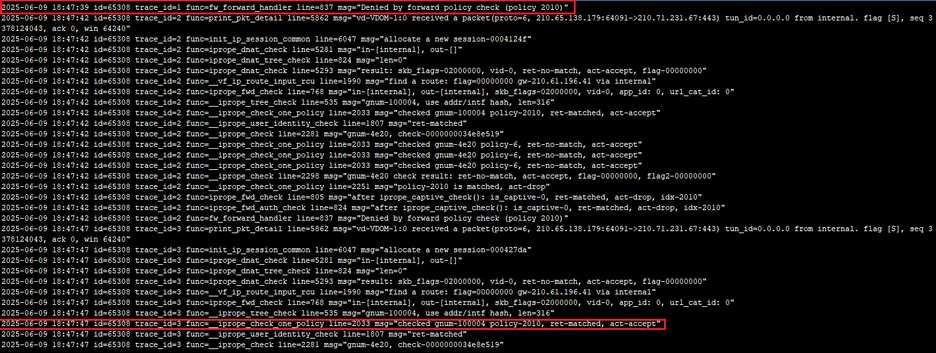
However, after upgrading from v7.2.10 to v7.2.11, the same one-arm packet flow will be forwarded, but will no longer match any policy rules by default.

Another example: if a policy is configured with NAT enabled, but traffic is forwarded without NAT, this indicates that the traffic does not match the policy. To resolve this issue: Check if the allow-traffic-redirect setting is enabled or disabled according to network requirements. Verify this setting by running 'config system global and then get allow-traffic-redirect'.
Technical Tip: Traffic handled by FortiGate for packet which ingress and egress same interface Technical Tip: How the FortiGate behaves when asymmetric routing is enabled
Before upgrading to v7.2.11, if 'allow-traffic-redirect' was enabled (the default), FortiGate would drop one-arm packets if their source IP was in a different subnet than the incoming interface. After upgrading to v7.2.11, by default, one-arm traffic will always be forwarded without any policy matching.
Changes in default behavior |
