Technical Tip: How to use special character in PPP username
Description
The Mobile vendors provide login data for the PPP authentication.
In some cases, PPP username contains special character.
An example: labheis-ugks#bq-p@sgks
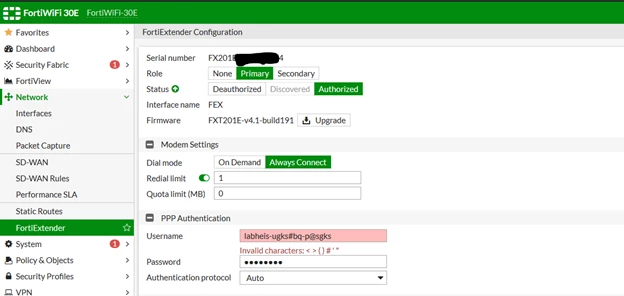
When a user tries to enter the PPP credential on FortiGate under Network -> FortiExtender, it will throw an error message as Special characters <, >, (,), #, ', and " are usually not permitted.
This article describes how to use special character in PPP username.
Solution
The workaround is to enter the credential on FortiExtender locally using CLI or GUI.
From GUI.
1) Login to FEXT IP.
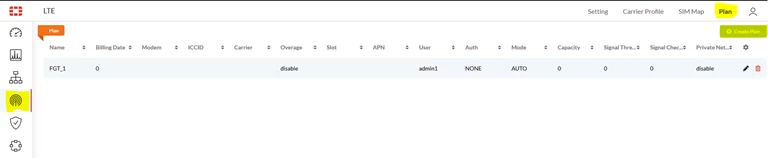
2) Go to LTE and select 'Plan'.
The Mobile vendors provide login data for the PPP authentication.
In some cases, PPP username contains special character.
An example: labheis-ugks#bq-p@sgks
When a user tries to enter the PPP credential on FortiGate under Network -> FortiExtender, it will throw an error message as Special characters <, >, (,), #, ', and " are usually not permitted.
This article describes how to use special character in PPP username.
Related link:
Page#66, Create a data plan:
Solution
The workaround is to enter the credential on FortiExtender locally using CLI or GUI.
From GUI.
1) Login to FEXT IP.
2) Go to LTE and select 'Plan'.
3) Select 'Create Plan' or edit the 'existing plan'.
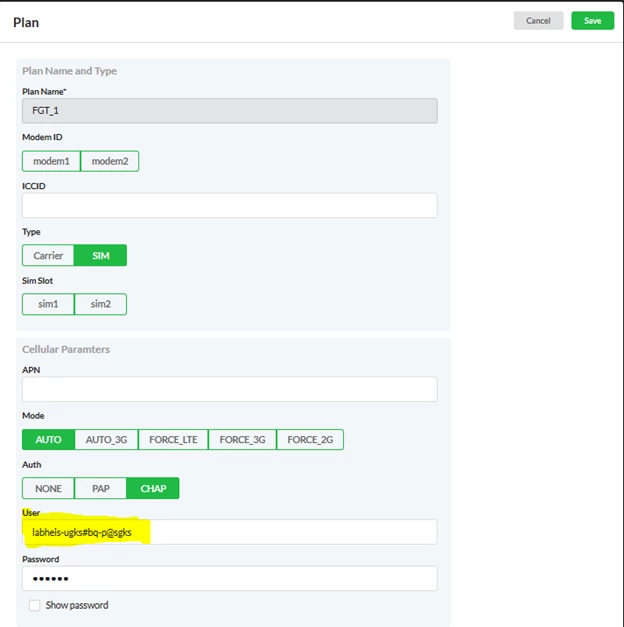
4) Select the desired auth-type and enter the username/password as shown in diagram.
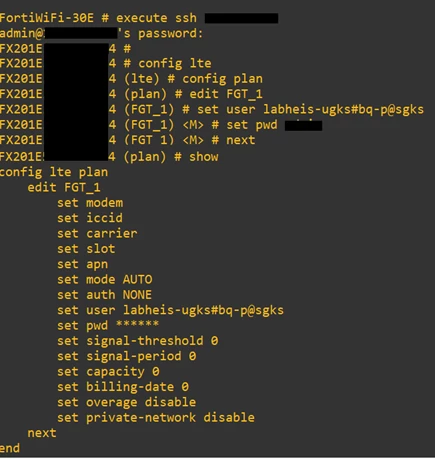
From CLI.
FortiGate # execute ssh <FEXT-IP>
FX201Exxxxxx4 # config lte
FX201Exxxxxx4 (lte) # config plan
FX201Exxxxxx4 (plan) edit <plan-name>
FX201Exxxxxx4 (plan-name) set auth
FX201Exxxxxx4 (plan-name) set user <username>
FX201Exxxxxx4 (plan-name) set pwd <password>
FX201Exxxxxx4 (plan-name) next