


Technical Tip: FortiExtender all ports are not available for configuration
| Description | This article describes the situation when a new FortiExtender is set up and all the physical ports are not seen to be configured and make required settings.
For example:
FortiExtender 200F has 5 LAN RJ45 ports in the CLI get system interface.
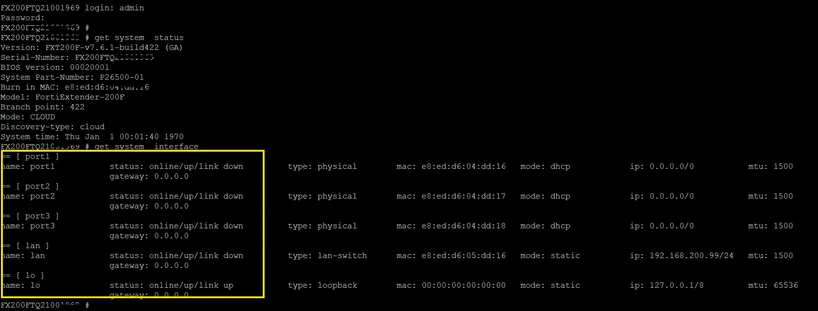
Port1, Port2, and Port3 can be seen in the output. These ports can be edited under config system interface. However, Port 4 and Port 5 are not seen directly. |
| Scope | All versions of FortiExtender. |
| Solution | By default, FortiExtender has a lan-switch interface. The lan-switch interface contains the remaining port. The lan-switch interface by default runs its own DHCP server 192.168.200.99/24 for the connected devices under it.
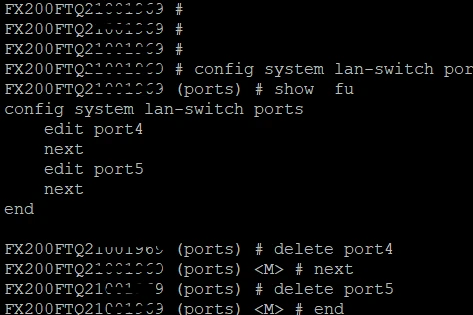
To see the ports 4 and 5:
FX200FTQ2100xxxx # config system lan-switch ports
To make the Port4 and Port5 available for general use:
Once the Ports are removed from the lan-switch interface, it will be seen under the get system interface. 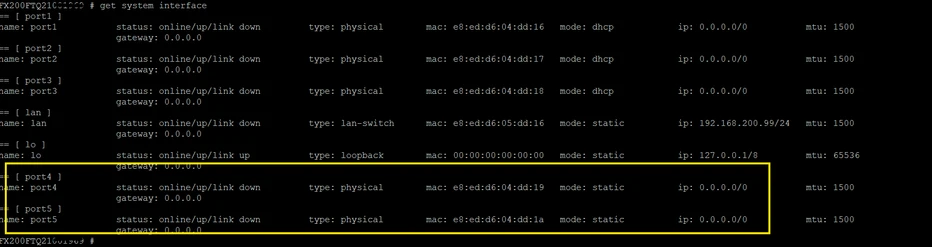 |

