Technical Tip: How to integrate FortiEndpoint with FortiAnalyzer-Cloud under same License.
| Description | This article describes the XML modifications required to integrate FortiEndpoint to be able to send logs to FortiAnalyzer Cloud. |
| Scope | FortiEndpoint. |
| Solution | Verify the compatibility EMS-Server Cloud version populated and FortiAnalyzer Cloud under the same license of FortiEndpoint, must be on the same family version. If FortiAnalyzer Cloud is on a different family requires an upgrade to match the EMS-Server version.
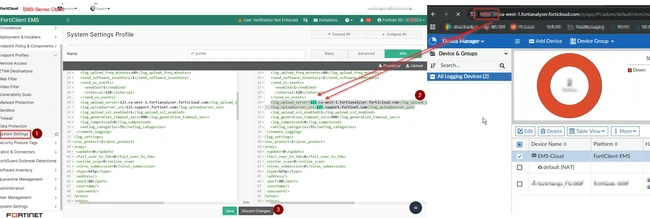
Edit XML associated with System Settings will be assigned to the FortiEndpoint, and add Account ID associated with the FortiEndpoint S/N example:
Account-ID=123 <log_upload_server>123.ca-west-1.fortianalyzer.forticloud.com</log_upload_server> <log_uploadserver_sni>123.support.fortinet.com</log_uploadserver_sni>
Related Article: Technical Tip: What to provide when opening a FortiEndpoint ticket with TAC |