RiverChen
Staff
Staff
Sep 23, 2025 4:55 AM UTC

Technical Tip: Incident in filtered list may show 'No results found”'in Event Details (by design)

Description This article describes a design change in FortiEDR v7.2, where applying filters (such as Handled/Unhandled or Classification) may cause the Event Details pane to show 'No results found'.
Scope

FortiEDR v7.2 and later

Solution

Starting in v7.2, the Incident list has been redesigned:

  • Before v7.2: The top-level row was a logical grouping of related events, and its attributes were derived from its child events.

  • Since v7.2: The top-level row is now an Incident entity with its own attributes (e.g., Status, Classification), while still linking to child events.

Impact of this change.

When filters are applied (e.g., Unhandled, Malicious):

  • The Incident may match the filter and still appear in the list.

  • If its child events do not match the filter, the Event Details section shows 'No results found'.

This can appear inconsistent, but it is expected behavior under the new design.

Example:

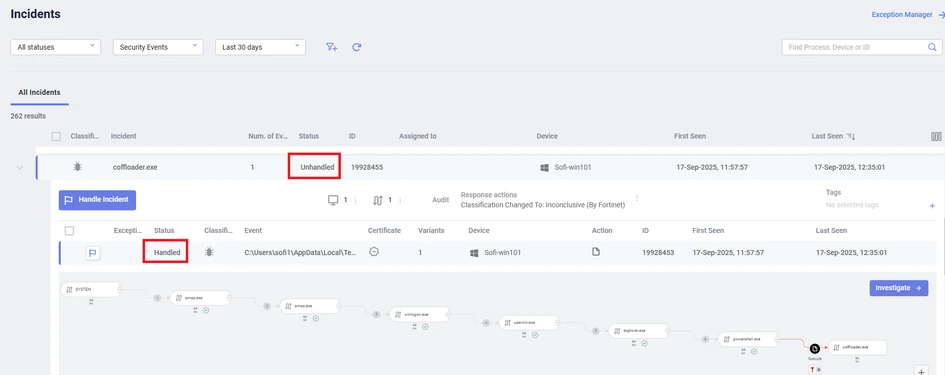
Without filters: Expanding an incident shows child events normally.


main page.png

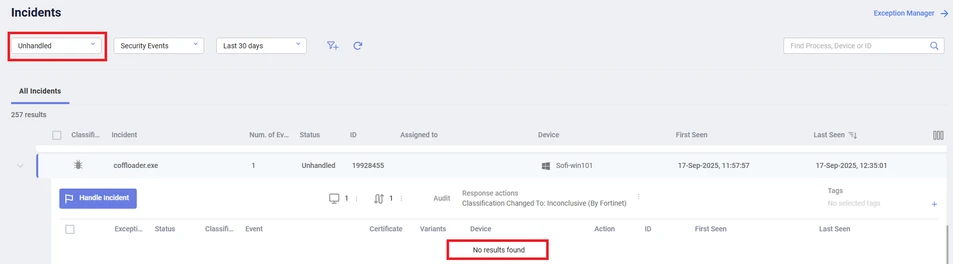
With Unhandled filter: The incident appears because the Incident itself is Unhandled. However, its child event is handled, so Event Details show 'No results found'.


no result found.png


Recommendations

  • This is by design in FortiEDR v7.2.

  • If Event Details show 'No results', check the actual status/classification of the child events.

  • Apply filters that match the child events (e.g., Inconclusive) to see their details.

    Thought Leadership. Security Summit. Thursday, November 12th, PGA National Resort, Palm Beach Gardens, FL.
    Security Operations Summit: Modernize SecOps. Operate AI-Native.AMER: November 4 | 9:00 AM PST. India and SAARC: November 5 | 10:00 AM IST. EMEA: November 5 | 10:30 AM CET. APAC: November 5 | 11:00 AM SGT