


Technical Tip: FortiEDR: EICAR test file detection
Description | This article describes how to configure FortiEDR to detect the EICAR test file. |
Scope | FortiEDR. |
Solution | FortiEDR is capable of detecting signature-based malware or files that are marked as malicious in our database.
FortiEDR, and different from traditional antivirus solutions, does not scan HDDs constantly but instead relies on behavior analysis and pre-execution detections.
To detect EICAR, the first thing that needs to be checked is the policies under Execution Prevention:
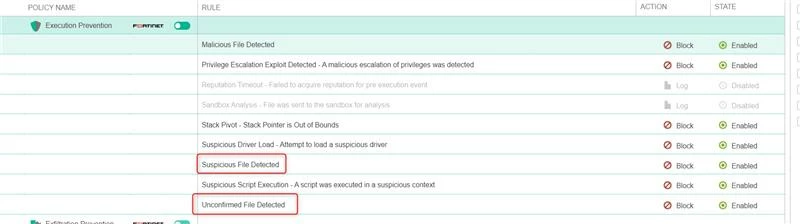
These two policies must be activated, and collectors are assigned to the correct Security Policies.
Second, assign the collector at least the default THR inventory profile so it is also possible to take advantage of Inventory Scanning.
Try copy-pasting the malicious file to the host. Steps to reproduce:
The security event is triggered only when executing the file on the Collector
Manager content should be at least 12100 and up.
|
