| Solution | After the FortiClient EMS upgrade is completed, certain FCEMS services fail to run:
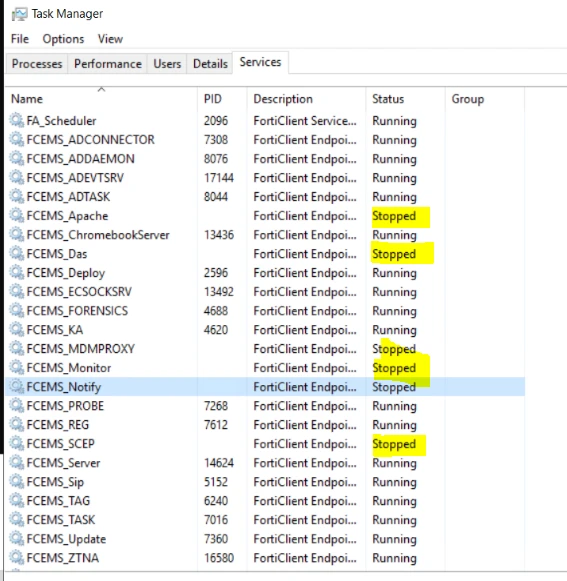
'Right-click' on FCEMS services and Start: it shows the error 'service cannot be started'. To fix this: - Open Windows Powershell command prompt, run:
netsh int ipv4 show dynamicport tcp
- Check the 'Number of Ports' output:
Protocol tcp Dynamic Port Range
---------------------------------
Start Port : 49152
Number of Ports : 255 <-- 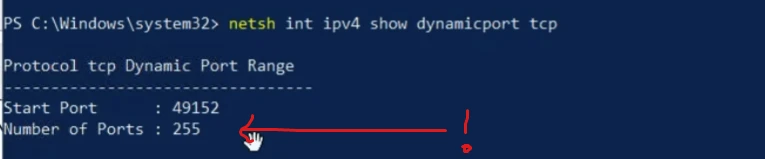
-
If the 'Number of Ports' is showing very little, for example, 255, this means the network ports are insufficient in this Windows Server. -
Run the command:
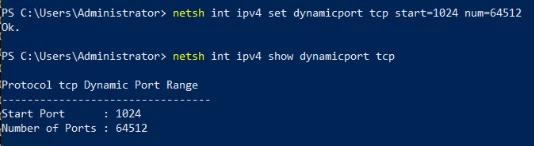
netsh int ipv4 set dynamicport tcp start=1024 num=64512
-
This will increase the number of Dynamic Ports to the Windows Default value, which will fix the issue:
PS C:\Users\Administrator> netsh int ipv4 show dynamicport tcp Protocol tcp Dynamic Port Range
---------------------------------
Start Port : 1024
Number of Ports : 64512
-
In Task Manager, run the FCEMS services again, they should be able to be up and run now. |