Solution | When a website is blocked by a FortiClient Web Filter profile, FortiClient should display the following block page:
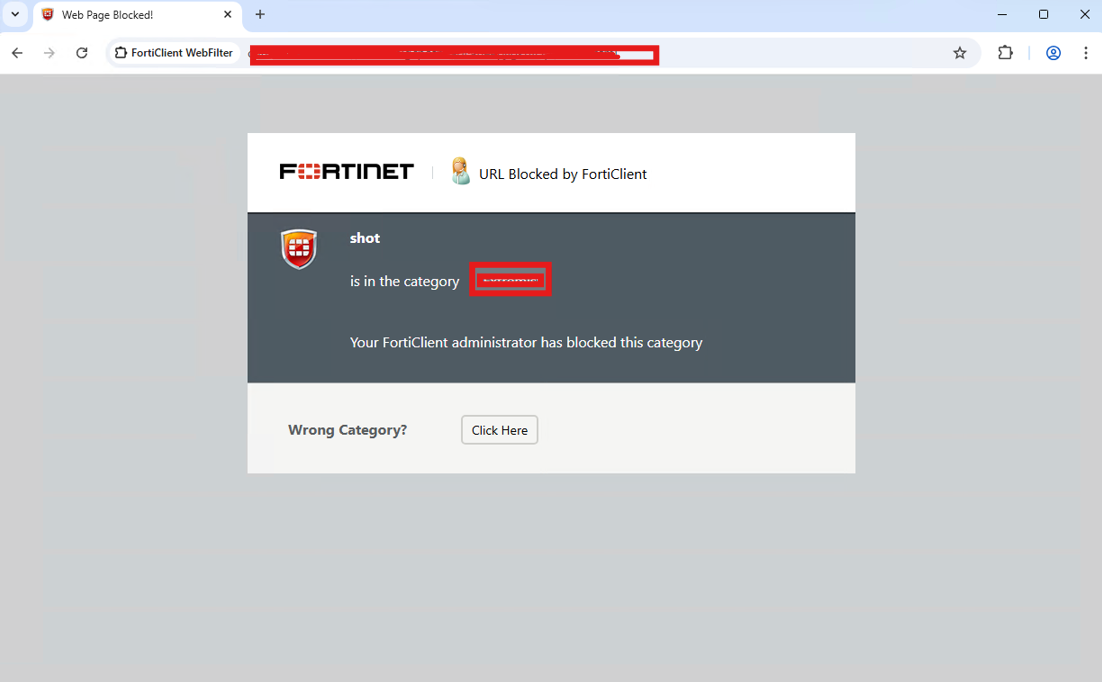
If the browser displays a blank page instead, perform the following troubleshooting steps:
Enable HTTPS Deep Inspection in the Web Filter of the assigned endpoint/user profile. In the MacBook, open Keychain Access -> System Keychain and locate the following certificates:
For each certificate: Double-click the certificate. Expand Trust. Set “When using this certificate” to Always Trust for both certificates.
These certificates are automatically installed during FortiClient installation when the Web Filter system extension is approved.
If certificates are missing, perform a clean reinstallation of FortiClient.
Go to System Settings -> Privacy & Security -> Full Disk Access:
Temporarily disable the following FortiClient components:
Uninstall FortiClient completely. When prompted during the uninstallation, enter the macOS administrator password to allow the system to remove the FortiClient components listed in Steps 4.
Reinstall the FortiClient. During installation, approve all system extension that prompts:
fcaptmon fctservctl fctservctl2 fmon FortiClient FortiClientAgent FortiClientProxy
Make sure to allow FortiClient Network Filter or Web Filter when prompted.
Recheck the FortiClient agents in System Settings -> Privacy & Security -> Full Disk Access. Make sure all agents on Step 7 is enable.
Recheck certificates in Keychain Access in Steps 2 and ensure they are trusted.
Test on a supported web browser by entering a URL configured with the Block under the Webfilter profile.
The browser will display the "FortiClient WebPage Blocked" message.
|