jie
Staff
Staff
Oct 23, 2025 5:36 AM UTC

Technical Tip: How to manually upgrade Redis version in EMS v7.4 environment to resolve Redis vulnerability CVE-2025-49844

Description This article explains how to upgrade Redis manually in the EMS v7.4 environment to cover the vulnerabilities of Redis.
Scope FortiClient EMS.
Solution

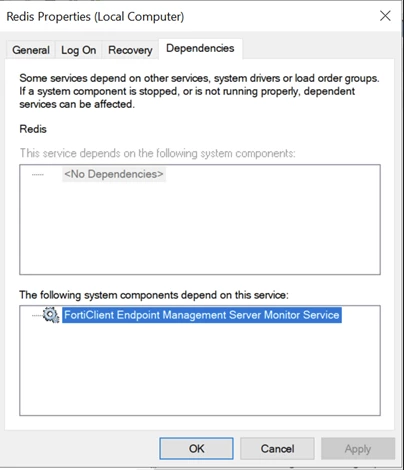
As FortiClient Endpoint Management Server Monitor Service is dependent on Redis to start, in Windows OS, it is hard to upgrade Redis separately from EMS, as it is installed in a bundle of EMS components.


5.PNG


But in Linux, Redis can be upgraded manually by following these steps:

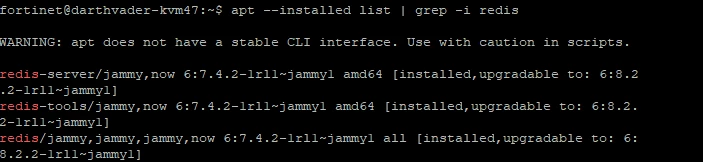
  • Run the below command and verify the currently installed Redis components:


apt --installed list | grep -i redis


1.PNG


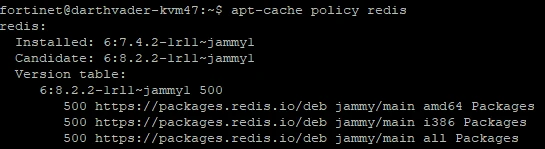
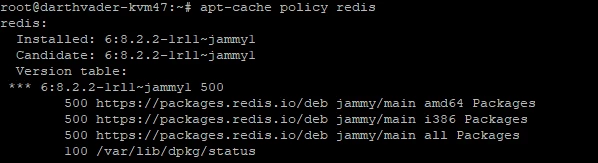
  • Check the installed Redis version table and the available candidate version table by running the command below:


apt-cache policy redis


2.PNG


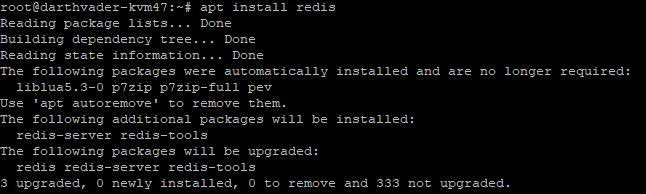
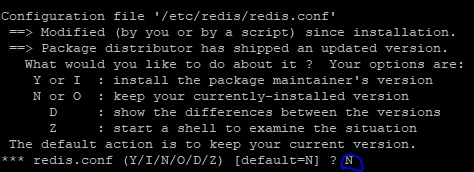
  • Start installing Redis by running the command:


apt install redis


3.PNG


4.PNG


  • Once the installation is completed, run the same command to check the current Redis version on the Linux machine.


6.PNG

    Thought Leadership. Security Summit. Thursday, November 12th, PGA National Resort, Palm Beach Gardens, FL.
    Security Operations Summit: Modernize SecOps. Operate AI-Native.AMER: November 4 | 9:00 AM PST. India and SAARC: November 5 | 10:00 AM IST. EMEA: November 5 | 10:30 AM CET. APAC: November 5 | 11:00 AM SGT