


Technical Tip: How to install and use Fortinet SSL VPN client on Windows 10 phone
Description
This article describes how to install and use Fortinet SSL VPN client on a Windows 10 phone.
Solution
Install Fortinet SSL VPN Client
1.) On Windows 10 desktop, install Windows 10 standalone SDK (https://dev.windows.com/en-us/downloads/windows-10-sdk). Edit PATH environment variable and add “C:\Program Files (x86)\Windows Kits\10\Windows Performance Toolkit\”.
2.) On Windows 10 phone, set development mode.
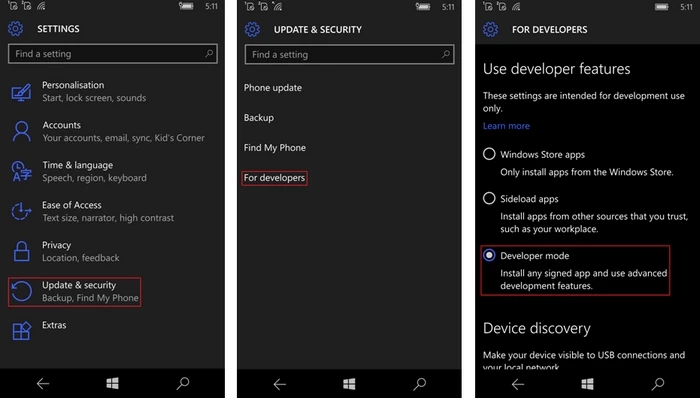
3.) Connect the phone to Windows 10 desktop. Open cmd.exe and run “winappdeploycmd devices”, make sure the phone shows up.
4.) Obtain Fortinet SSL Client appx file. In cmd.exe and run “winappdeploycmd install -file FortiSslVpnPluginApp_1.0.1024.0_ARM.appx -ip 127.0.0.1”.
Here FortiSslVpnPluginApp_1.0.1024.0_ARM.appx is the appx file you obtained, 127.0.0.1 is the IP that shows up when you run “winappdeploycmd devices”.
Use Fortinet SSL VPN Client
1.) Create a new VPN connection.
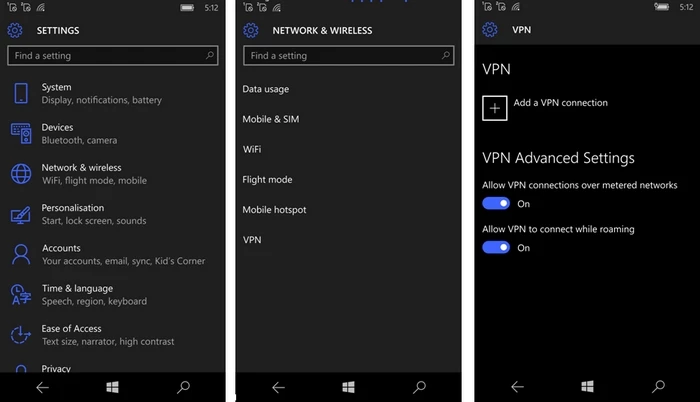
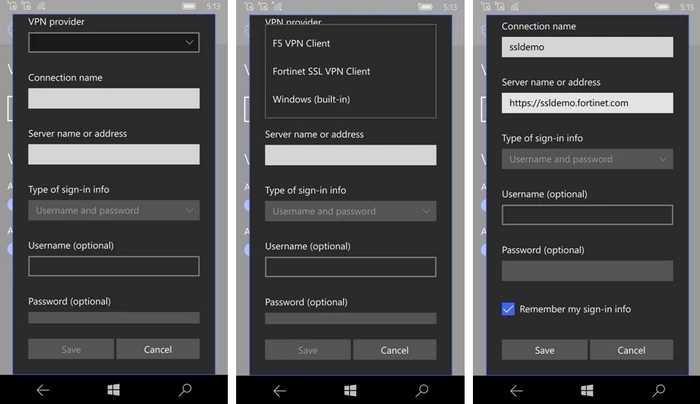
2.) Connect to VPN.
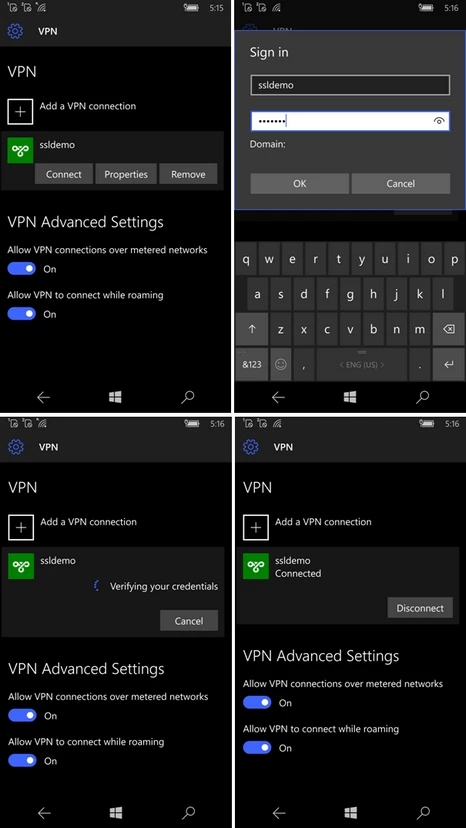
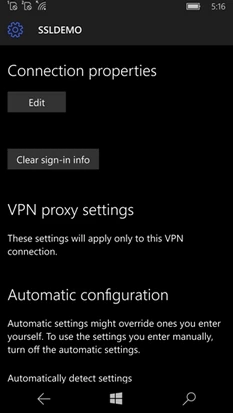
3.) To clear the saved user name and password.
4.) More options for “Server name or address” field.
(a) To use port 10443 and realm “realmname”:
(b) To ignore server certificate error:
(c) To enable pop-up to select client certificate:
(d) To pre-configure a client certificate:
(e) To use PKI user (certificate user):
1.) On Windows 10 desktop, install Windows 10 standalone SDK (https://dev.windows.com/en-us/downloads/windows-10-sdk). Edit PATH environment variable and add “C:\Program Files (x86)\Windows Kits\10\Windows Performance Toolkit\”.
2.) On Windows 10 phone, set development mode.
3.) Connect the phone to Windows 10 desktop. Open cmd.exe and run “winappdeploycmd devices”, make sure the phone shows up.
4.) Obtain Fortinet SSL Client appx file. In cmd.exe and run “winappdeploycmd install -file FortiSslVpnPluginApp_1.0.1024.0_ARM.appx -ip 127.0.0.1”.
Here FortiSslVpnPluginApp_1.0.1024.0_ARM.appx is the appx file you obtained, 127.0.0.1 is the IP that shows up when you run “winappdeploycmd devices”.
Use Fortinet SSL VPN Client
1.) Create a new VPN connection.
2.) Connect to VPN.
3.) To clear the saved user name and password.
4.) More options for “Server name or address” field.
(a) To use port 10443 and realm “realmname”:
https://vpn.server.addrerss.com:10443/realmname
(b) To ignore server certificate error:
https://vpn.server.addresss.com:10443/realmname?ignore-certificate-errors=1 , or
https://vpn.server.addresss.com:10443/realmname?ice=1 , or
https://vpn.server.addresss.com:10443/realmname?ice
(c) To enable pop-up to select client certificate:
https://vpn.server.addresss.com:10443/realmname?cert=
(d) To pre-configure a client certificate:
https://vpn.server.addresss.com:10443/realmname?cert=SubStringOfCertSubject
(e) To use PKI user (certificate user):
https://vpn.server.addresss.com:10443/realmname?cert=&no-username-password=1 , or
https://vpn.server.addresss.com:10443/realmname?cert=&nup=1 , or
https://vpn.server.addresss.com:10443/realmname?cert=&nup
