Khidzir_MN
Staff
Staff
Jan 27, 2025 7:04 AM UTC

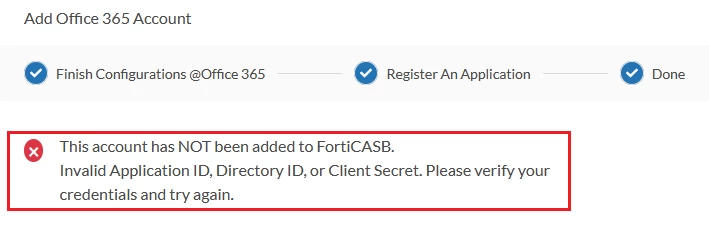
Troubleshooting Tip: 'Invalid Application ID, Directory ID, or Client Secret' error when adding an Office365 account in FortiCASB

Description This article describes how to troubleshoot the 'Invalid Application ID, Directory ID, or Client Secret' error when adding an Office365 account in FortiCASB.
Scope FortiCASB.
Solution

FortiCASB gives an 'Invalid Application ID, Directory ID, or Client Secret' error when adding an Office365 account.


forticasb_error.png


Verify the following license requirements and configuration:

  1. FortiCASB License Requirement for Office365 The latest list of Office365 license plans that are required by FortiCASB is available in the document link at the end of this article.
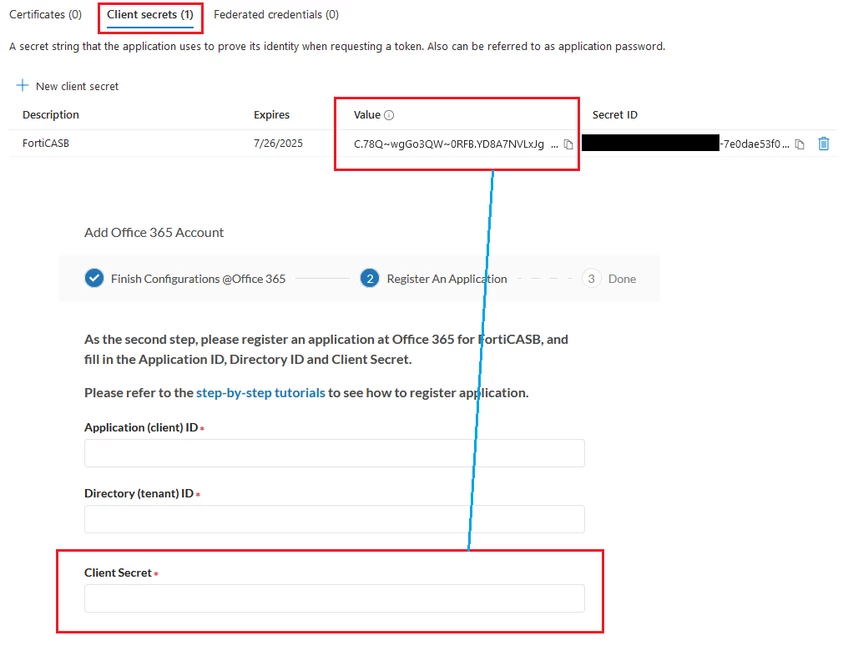
  2. Input the correct Client Secret when registering the Office365 at the FortiCASB: Refer to the below example on the correct value for the Client Secret. It is NOT the value for the Secret ID.


client_secret.png


Related documents:
Office 365 Account and License

Register FortiCASB with Microsoft Identity Platform

    Risk and Resilience in the Age of AI. An OT Thought Leadership Summit for Houston's Critical Infrastructure Leaders. Date: Thursday, December 3, 2026. Time: 8:30 am - 1:30 pm (CT). Location: The Westin Houston, Memorial City | 945 Gessner Road, Houston, TX 77024