
Technical Tip: Enforcing RFC 6797 'HTTP Strict Transport Security (HSTS)'
| Description | This article describes how to enforce HSTS on FortiAuthenticator. |
| Scope | FortiAuthenticator. |
| Solution | RFC 6797 (HSTS) is not a vulnerability, but a mitigation instead. HSTS was introduced specifically to prevent SSL stripping and Man-in-the-middle attacks, as it is a web security policy mechanism that allows a web server to declare that browsers (or other complying user agents) should only interact with it using secure HTTPS connections.
The FortiAuthenticator is not enforcing HSTS by default, and this is an expected behavior. If the FortiAuthenticator is being scanned by any vulnerability checking tools, the following result might be seen:
The HTTPS server is 'not including' the 'Strict-Transport-Security' header in its responses. This means browsers might allow users to access the site via unencrypted HTTP after a redirect or in case of downgrade attacks.
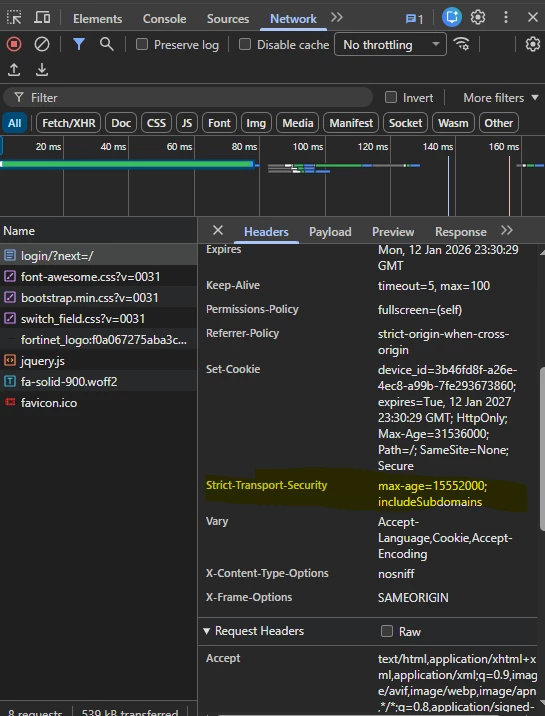
Behind the scenes, the FortiAuthenticator will not send the following HTTP response header by default:
Strict-Transport-Security: max-age=31536000
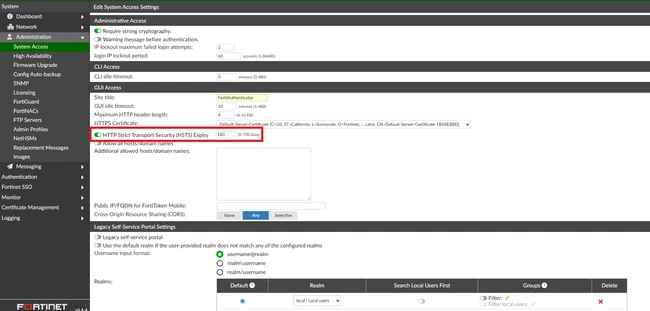
To force FortiAuthenticator to respond with the HTTP response header above, it requires making the following changes: Log in to FortiAuthenticator GUI and follow the steps below to enable 'HTTP Strict Transport Security (HSTS) Expiry'. System -> Administration -> System Access -> enable HTTP Strict Transport Security (HSTS) Expiry.
This is a global setting. When having this option enabled, all other URLs related to the FortiAuthenticator, such as SAML SP, Captive Portal, and so on, will all return with this message in the HTTP response header.
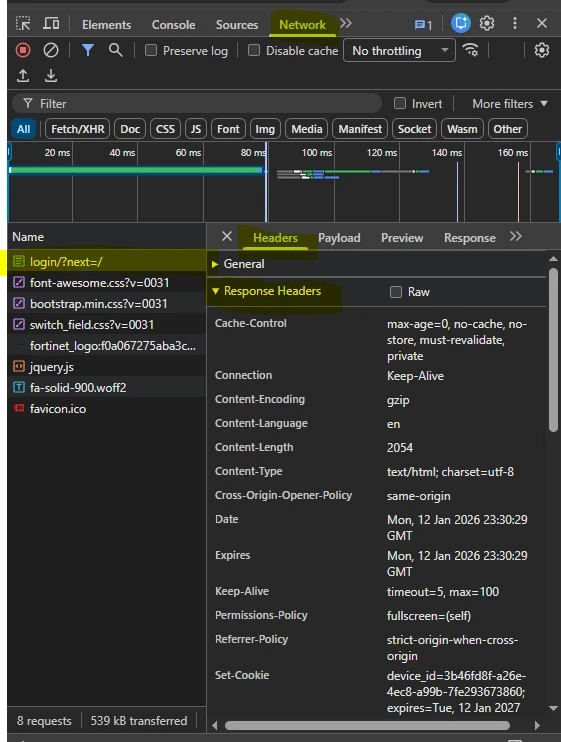
To validate whether the HTTP response header contains this information, the following steps can be taken in the Chrome Browser:
The snapshot below is an example of how to find this information.
|