


Technical Tip: Configuring remote sync-rules when already imported users are available
Description | This article describes how to import users using remote-sync rules when already imported users are there. |
Scope | FortiAuthenticator. |
Solution | Using remote sync rules, users can import users from either an OU or/Security group. Importing a remote user and assigning a FortiMobile token.
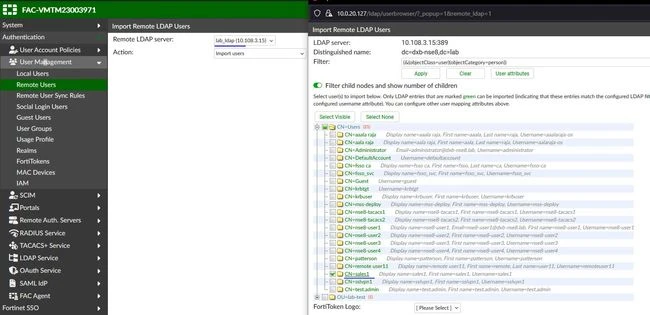
Assigning a FortiMobile token to the 'sales1' user. 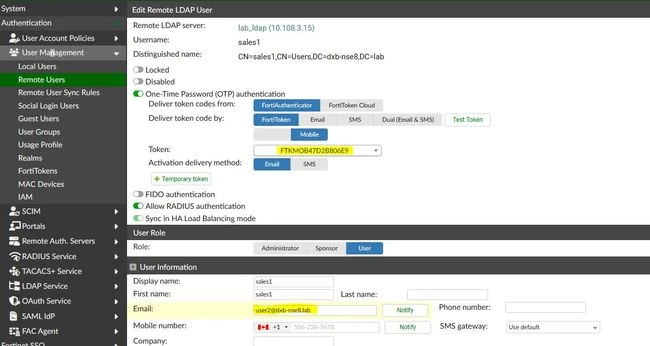
Creating a remote-sync rule:
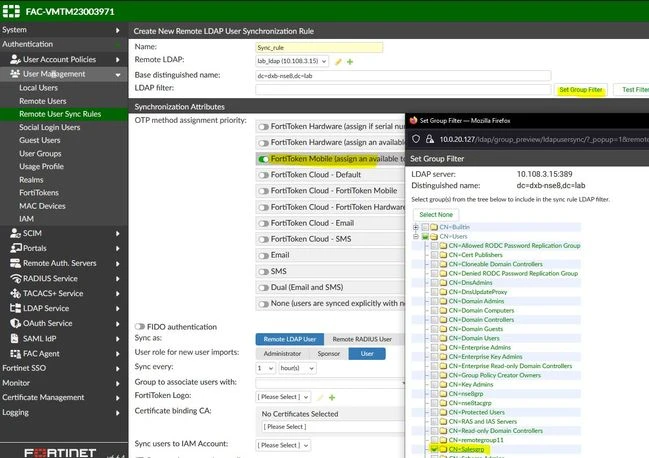
Once the remote user sync rule is created then select the same and select Manual Sync. After this, the users will get synced with Remote Users.
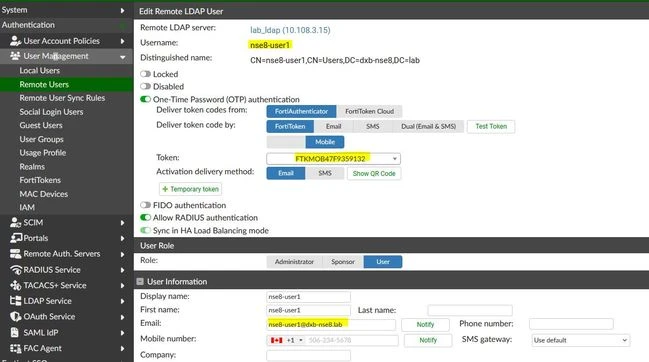
For the above user 'nse8-user1', FortiAuthenticator has allotted the FortiMobile and email ID automatically.
While doing sync with multiple users, FortiAuthenticator should have enough free FortiMobile tokens in case the administrator has selected the 'FortiToken Mobile (assign an available token)' option while creating a Sync rule under Synchronization Attributes -> OTP method assignment priority.
If FortiAuthenticator does not have enough FortiMobile tokens, then the Sync rule does not import any users. In this case admin can select the option 'None (users are synced explicitly with no token-based authentication)'. Note: Remote user synchronization rules have a behavioral change for FortiToken Mobile activation, effective in FortiAuthenticator v6.6.10 GA. |

