gsharma
Staff
Staff
Dec 9, 2024 8:03 AM UTC

Technical Tip: How to block 'http_agent="Dart/3.3 (dart:io)"'

Description This article describes how to block 'http_agent="Dart/3.3 (dart:io)"' on FortiAppSec Cloud.
Scope FortiAppSec Cloud.
Solution

FortiAppSec Cloud can be used to block the traffic coming from 'http_agent="Dart/3.3 (dart:io)"'. For that Custom Rule can be created.


To create a Custom Rule for blocking 'http_agent="Dart/3.3 (dart:io)"'.

  1.  Open the application in which Dart/3.3 needs to be blocked.
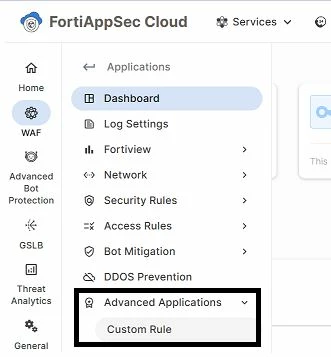
  2. On the left Pan, go to Advanced Application -> Custom Rule.


pic1.JPG


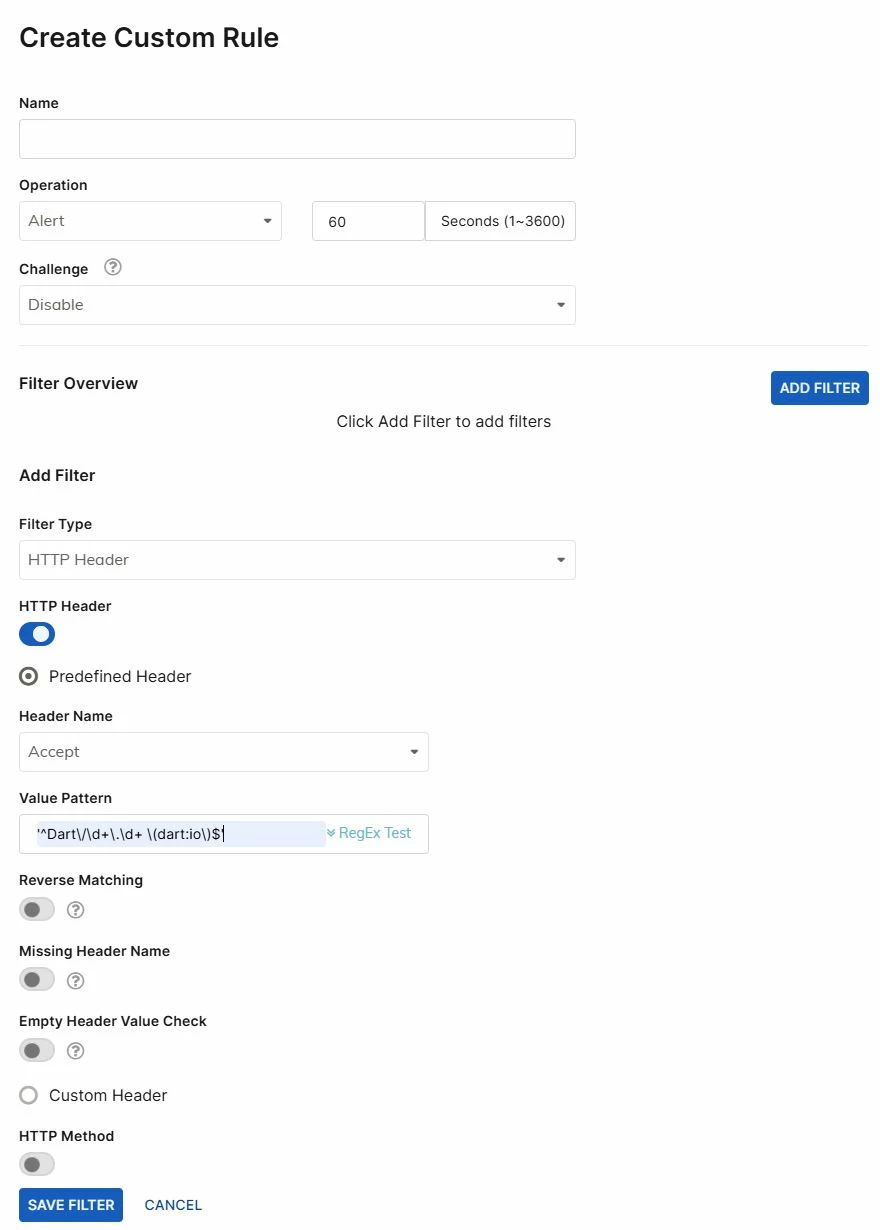
  1.  Create a Rule, by Defining the name and Operation as either Alert/Deny or Period Block.
  2. After the rule is made, it is necessary to add Filter, so below the rule select Add Filter ->  Filter-type: HTTP Header -> Header Name: User-Agent.
  3. Inside the Value Pattern, fill the RegEx code as '^Dart\/\d+\.\d+ \(dart:io\)$' (this can be modified based on the http_agent in the traffic logs) and select Save Filter.

    pic2.JPG


Note:

If the issue is not resolved, reach out to the support helpline with the required config and logs. The Regex code used above might need to be modified based on the requirement. 

Thought Leadership. Security Summit. Thursday, November 12th, PGA National Resort, Palm Beach Gardens, FL.
Security Operations Summit: Modernize SecOps. Operate AI-Native.AMER: November 4 | 9:00 AM PST. India and SAARC: November 5 | 10:00 AM IST. EMEA: November 5 | 10:30 AM CET. APAC: November 5 | 11:00 AM SGT