


Technical Tip: How to configure NAC Policies for WLAN
Description
This article describes how to configure NAC policies for Wireless devices.
Scope
FortiGate 100E 7.2.5.
FortiSwitch 108E-POE 7.4.0.
FortiAP 221E 7.2.2.
Solution
Network Access Control (NAC) facilitates the implementation of network policies to regulate devices and users accessing a network. The wireless NAC policy is established based on identifiable patterns associated with users and devices.
These patterns may involve user groups and device hardware information. The NAC can be activated for SSIDs operating in either tunnel or bridged mode and requires a minimum of 2 VLANs for setting up the onboarding segment and the appropriate VLAN for the Wireless Devices. These VLANs must have L3 settings, including DHCP and network device detection services.
Devices that conform to an NAC policy will be allocated to the VLAN configured within the NAC policy for the wireless controller section. Moreover, the NAC policy can also be utilized for FortiSwitch NAC.
In this case, let's create four VLANs:
Onboarding VLAN (vap_v300 – VLAN ID 100).
VLAN for Android OS (vap_v400 – VLAN ID 400).
VLAN for Windows OS despite its version (vap_v500 – VLAN ID 500).
VLAN for Apple iOS (vap_600 - VLAN ID 600).
The steps to configure are as follows:
Configure VAP SSID:
config wireless-controller vap
edit "wifi.vap.01" <--
set ssid "laltuzar-nac"
set passphrase *********
set schedule "always"
next
endCreate four VLAN interfaces under the VAP created in step 1
config system interface
edit "vap_v300"
set vdom "root"
set ip 10.100.1.1 255.255.255.0
set allowaccess ping
set description "Onboarding VLAN"
set device-identification enable
set role lan
set interface "wifi.vap.01"
set vlanid 100
next
edit "vap_v400"
set vdom "root"
set ip 10.101.1.1 255.255.255.0
set allowaccess ping https ssh http speed-test
set device-identification enable
set role lan
set interface "wifi.vap.01"
set vlanid 400
next
end
edit "vap_v500"
set vdom "root"
set ip 10.102.1.1 255.255.255.0
set allowaccess ping https ssh http speed-test
set device-identification enable
set role lan
set interface "wifi.vap.01"
set vlanid 500
next
edit "vap_v600"
set vdom "root"
set ip 10.103.1.1 255.255.255.0
set allowaccess ping https ssh http speed-test
set device-identification enable
set role lan
set interface "wifi.vap.01"
set vlanid 600
next
endCreate the Wireless NAC profile and assign the onboarding VLAN
config wireless-controller nac-profile
edit "wifi-nac-profile-1"
set onboarding-vlan "vap_v300"
next
endSelect the wireless NAC profile in the VAP:
config wireless-controller vap
edit "wifi.vap.01"
set nac enable
set nac-profile "wifi-nac-profile-1"
next
endCreate the SSID policy:
config wireless-controller ssid-policy
edit "wifi-sssid-policy-1"
set vlan "vap_v400"
next
edit "NACPolicyWindows"
set vlan "vap_v500"
next
edit "NACPolicyiPhone"
set vlan "vap_v600"
next
endCreate the NAC policies based on the STA's OS. In this case, vap_v400 will be used for Android devices, vap_v500 for Windows, and vap_600 for iOS users:
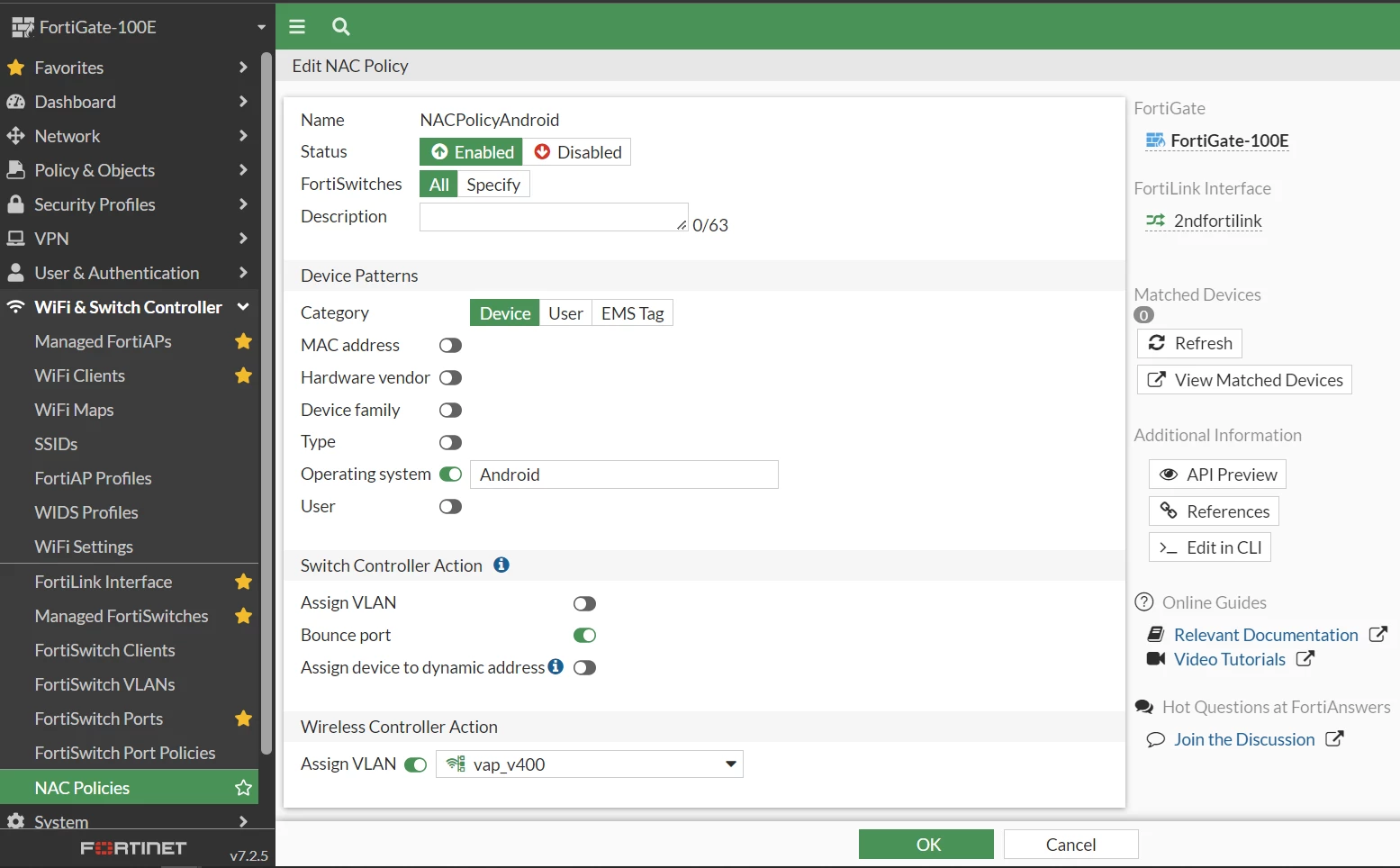
NAC Policy for Android Users
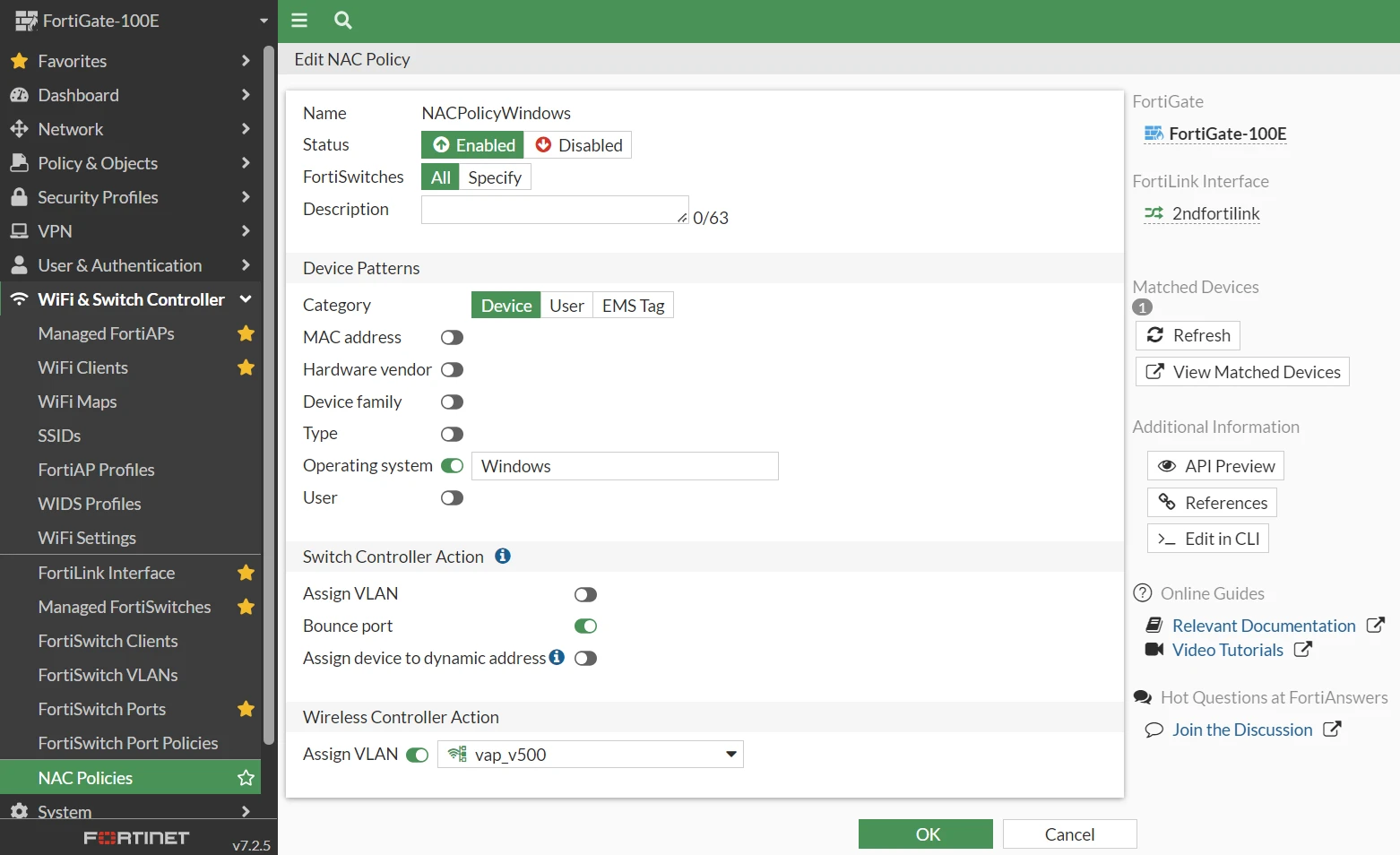
NAC Policy for Windows Users
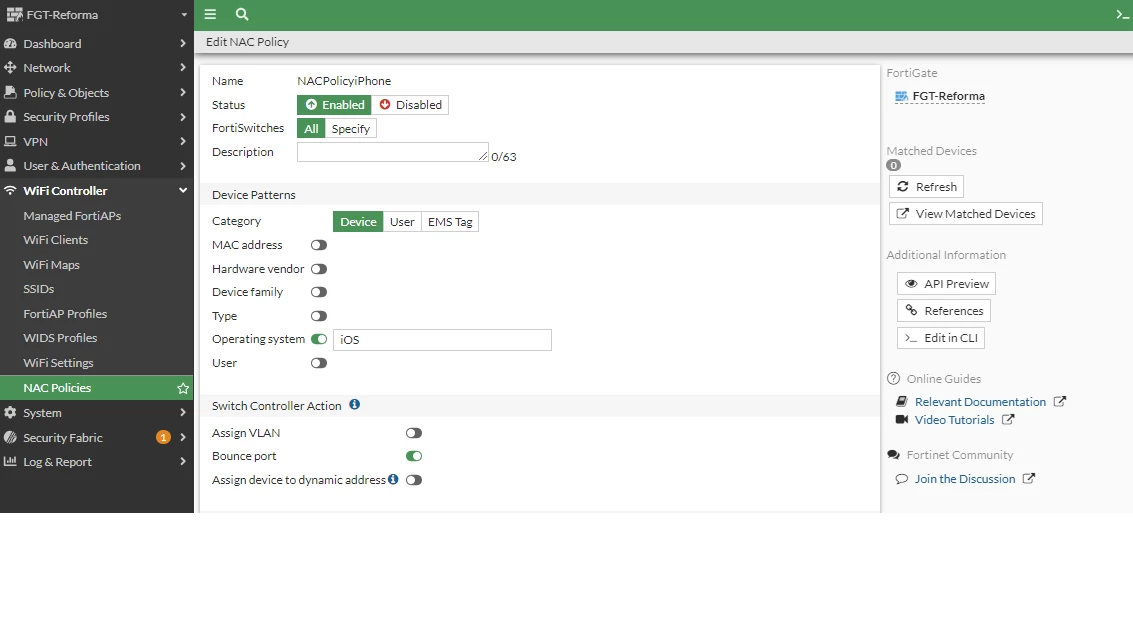
NAC Policy for Windows Users.
Once finished, the interfaces should look like this:
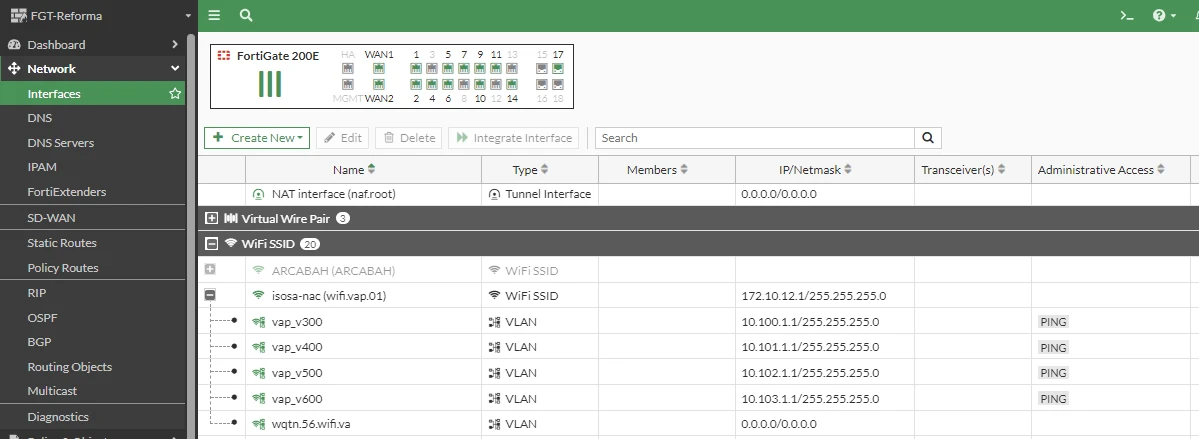
With the corresponding DHCP settings:
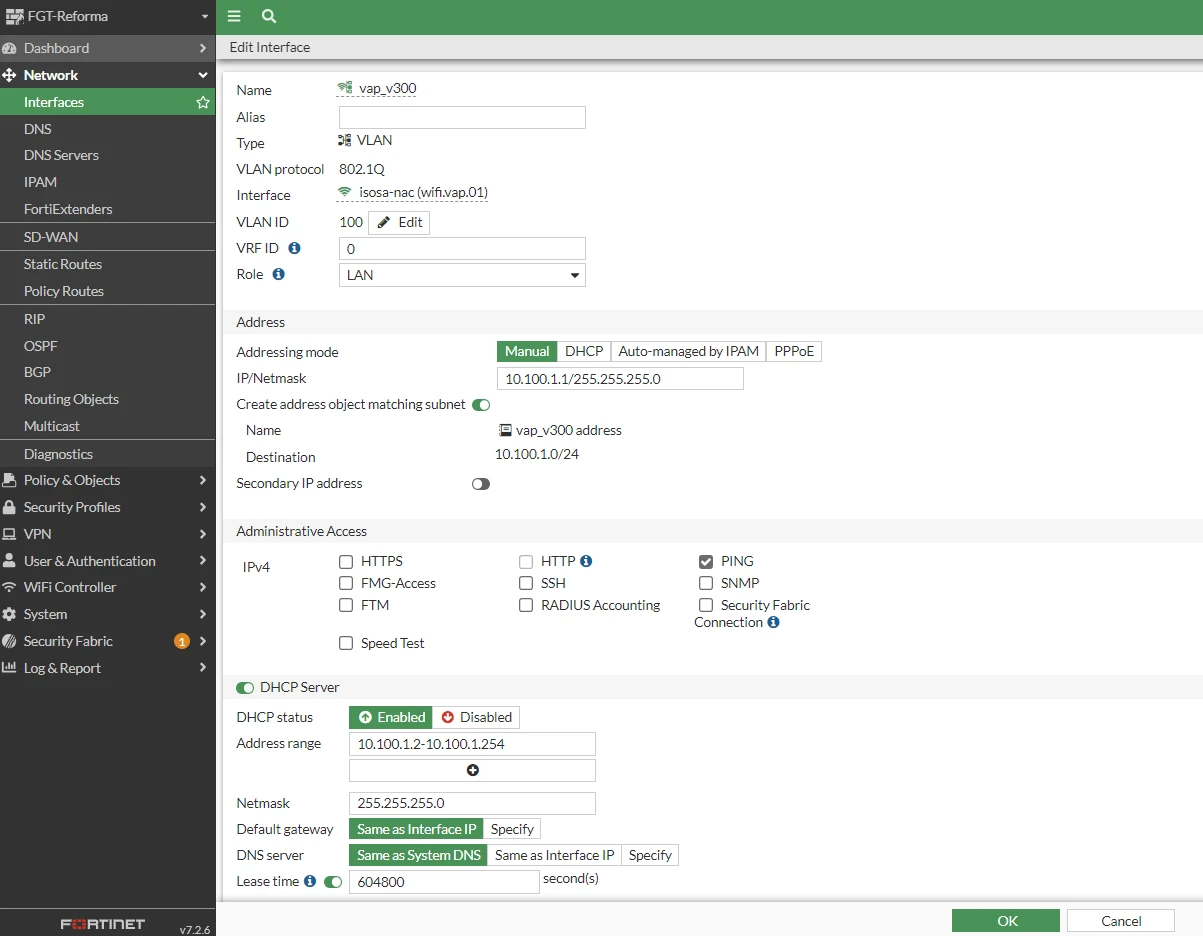
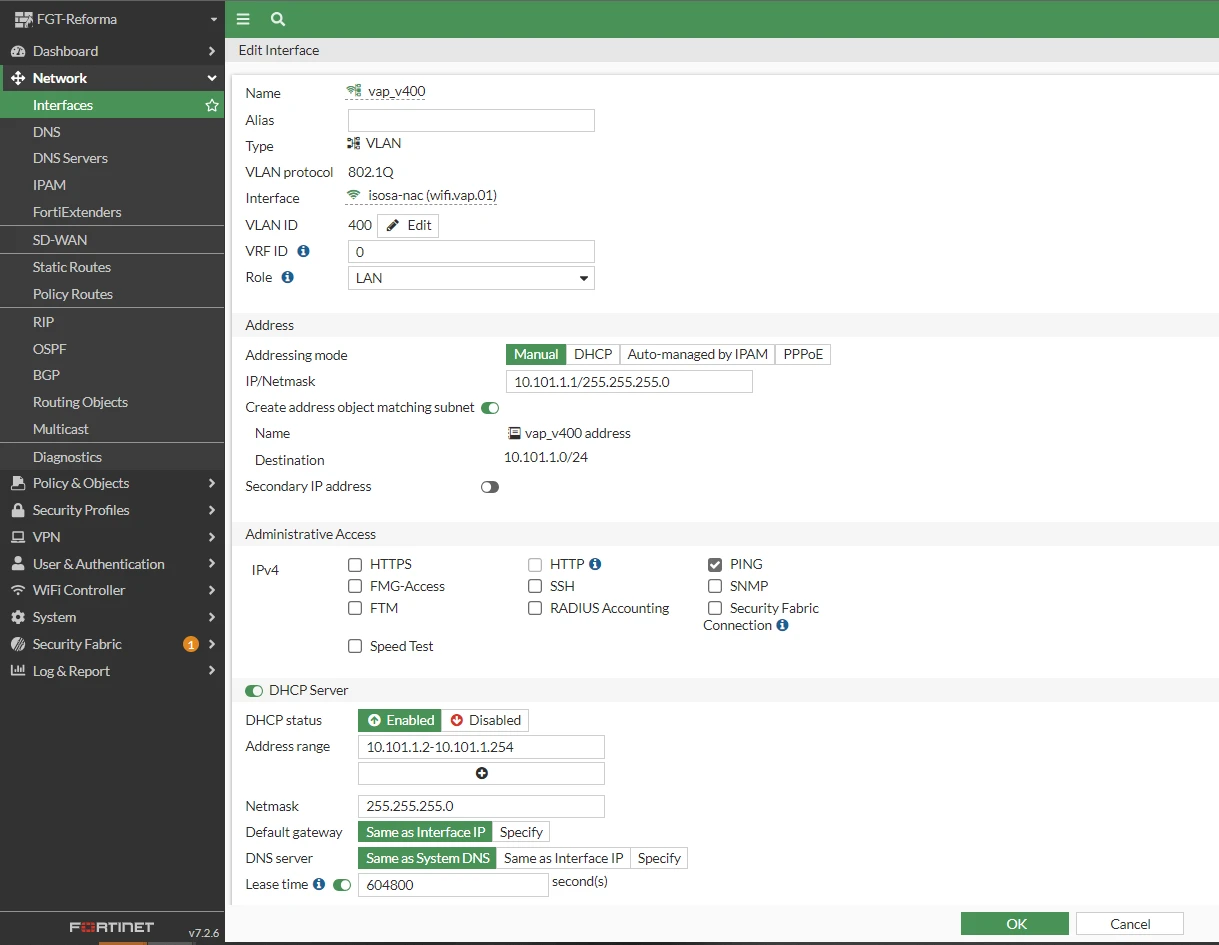
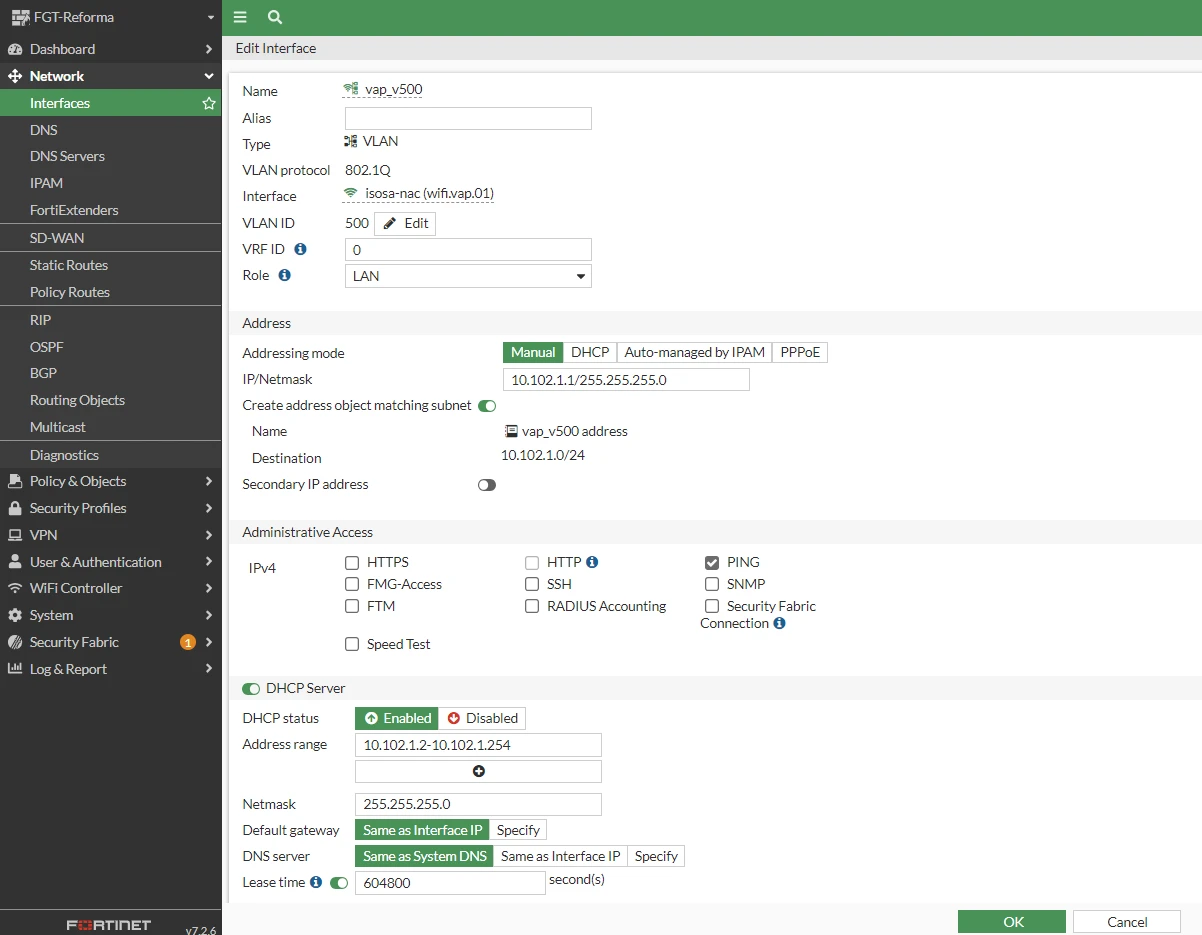
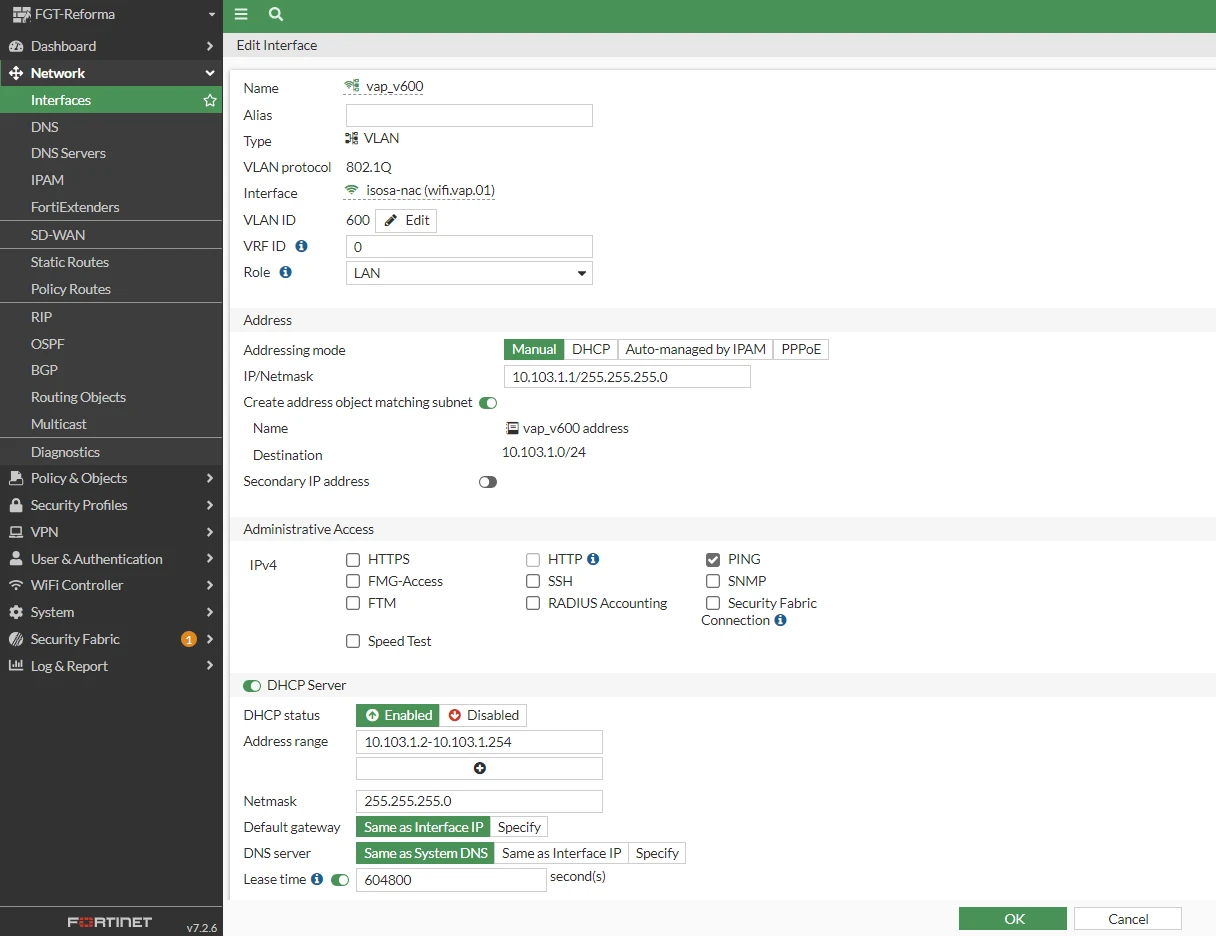
Finally, the SSID should look something like this:
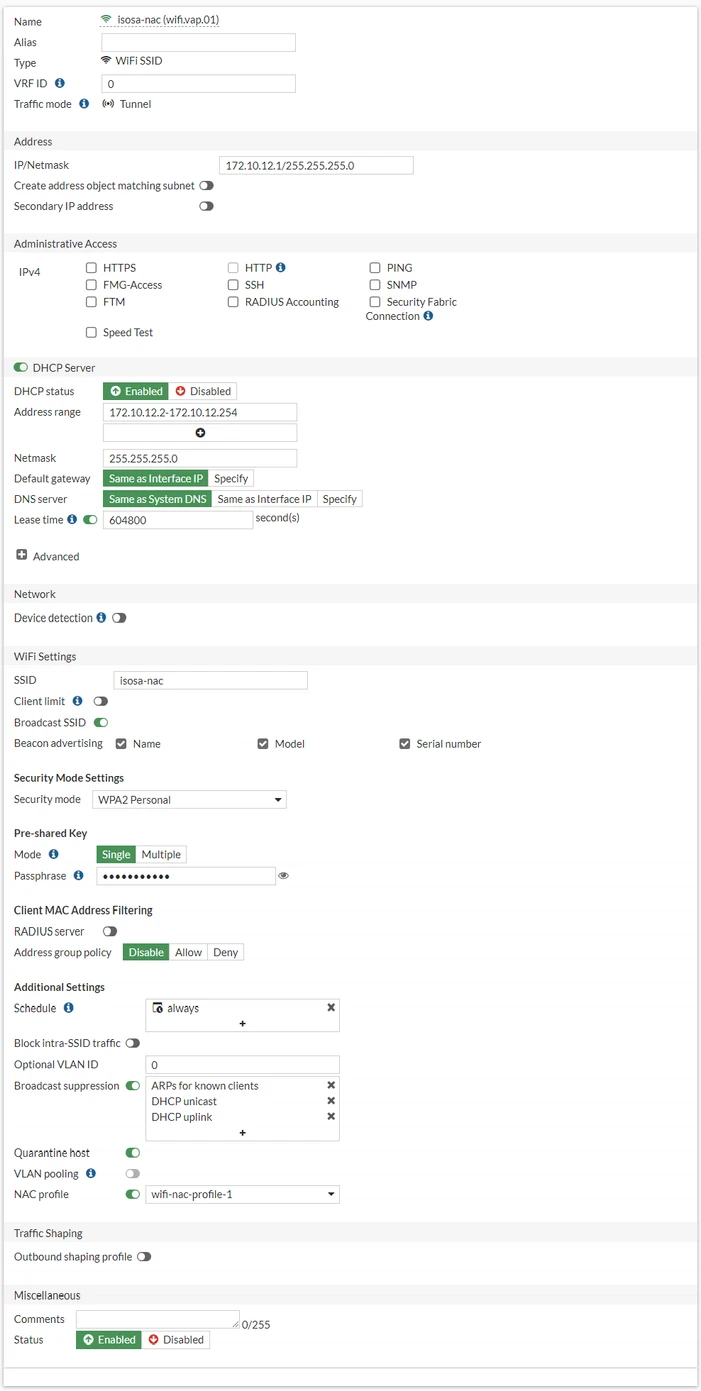
SSID in Bridge Mode:
How to configure NAC Policies for WLAN with Bridge Mode:
The previous example uses SSIDs in Tunnel mode with the IP addressing on the VLANs configured under the SSID.
However, when using SSIDs in Bridge mode, the IP addressing instead is configured on the switch VLANs, which need to use the same VLAN number as the VLANs defined under the SSID. The connection to the FortiAPs then need to be configured as trunks.
Consequently, this configuration would instead look like the following, assuming that 'fortilink' is the interface for the FortiSwitches:
Create four VLAN interfaces under the VAP created in step 1:
 config system interface
    edit "fsw_v300"
        set vdom "root"
        set ip 10.100.1.1 255.255.255.0
        set allowaccess ping
        set description "Onboarding VLAN"
        set device-identification enable
        set role lan
        set interface "fortilink"
        set vlanid 100 <-- This must match the corresponding vap vlanid
    next
    edit "fsw_v400"
        set vdom "root"
        set ip 10.101.1.1 255.255.255.0
        set allowaccess ping https ssh http speed-test
        set device-identification enable
        set role lan
        set interface "fortilink"
        set vlanid 400
    next
    edit "fsw_v500"
        set vdom "root"
        set ip 10.102.1.1 255.255.255.0
        set allowaccess ping https ssh http speed-test
        set device-identification enable
        set role lan
        set interface "fortilink"
        set vlanid 500
    next
    edit "fsw_v600"
        set vdom "root"
        set ip 10.103.1.1 255.255.255.0
        set allowaccess ping https ssh http speed-test
        set device-identification enable
        set role lan
        set interface "fortilink"
        set vlanid 600
    next
    edit "vap_v300"
        set vdom "root"
        set ip 0.0.0.0 0.0.0.0
        set allowaccess ping
        set description "Onboarding VLAN"
        set device-identification enable
        set role lan
        set interface "wifi.vap.01"
        set vlanid 100
    next
    edit "vap_v400"
        set vdom "root"
        set ip 0.0.0.0 0.0.0.0
        set allowaccess ping https ssh http speed-test
        set device-identification enable
        set role lan
        set interface "wifi.vap.01"
        set vlanid 400
    next
    edit "vap_v500"
        set vdom "root"
        set ip 0.0.0.0 0.0.0.0
        set allowaccess ping https ssh http speed-test
        set device-identification enable
        set role lan
        set interface "wifi.vap.01"
        set vlanid 500
    next
    edit "vap_v600"
        set vdom "root"
        set ip 0.0.0.0 0.0.0.0
        set allowaccess ping https ssh http speed-test
        set device-identification enable
        set role lan
        set interface "wifi.vap.01"
        set vlanid 600
    next
end
Note:
NAC policies are evaluated from top to bottom. If there are two NAC policies that satisfy the device requirements, the device will match the first policy in the list and be assigned an IP address from the VLAN specified in that policy.
Any device that does not match any NAC policy will remain in the onboarding or quarantine VLAN defined in the NAC policy.
A wildcard NAC policy can be used to assign devices to a specific VLAN if they do not match any of the other NAC policies:
Technical Tip: Setting up default NAC Policy for Unmatched/unknown Devices

