Nur
Staff
Staff
Apr 2, 2024 1:22 PM UTC

Troubleshooting Tip: Unable to log in to Fortianalyzer with SAML SSO

Description This article describes how to resolve an issue where the customer is unable to log in to FortiAnalyzer using SAML SSO.
Scope SAML SSO, Azure, and FortiAnalyzer.
Solution

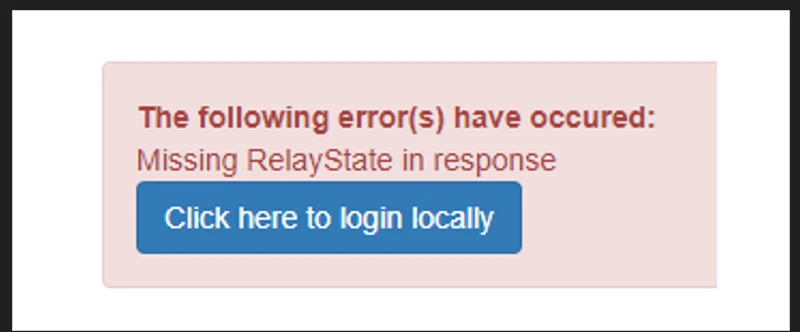
The following error appears upon trying to access FortiAnalyzer with SAML SSO:


Screenshot 2024-04-02 210346.png


To fix this:

Step 1: Set the Relay State in Azure.

  1. Go to the Azure portal.
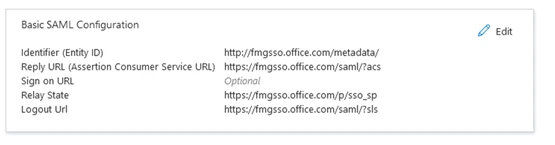
  2. In the SAML configuration for the FortiAnalyzer application, fill in the Relay State field with the following URL format:


https://<IP address or FQDN>:<port number>/p/sso_sp/

Step 2: Adjust the Reply URL (if Step 1 did not work).

  1. Go back to the Azure portal’s SAML configuration.
  2. Ensure that the Reply URL matches the SP ACS (Login) URL for the FortiAnalyzer.
  3. Leave the Sign on URL field blank in the SAML configuration.


Screenshot 2024-04-02 211039.png


Related article:

Technical Tip: SAML SSO - FortiManager/FortiAnalyzer Troubleshooting Options.

    Thought Leadership. Security Summit. Thursday, November 12th, PGA National Resort, Palm Beach Gardens, FL.
    Security Operations Summit: Modernize SecOps. Operate AI-Native.AMER: November 4 | 9:00 AM PST. India and SAARC: November 5 | 10:00 AM IST. EMEA: November 5 | 10:30 AM CET. APAC: November 5 | 11:00 AM SGT