dbu
Staff
Staff
Feb 10, 2026 4:08 PM UTC

Technical Tip: FortiAnalyzer log aggregation

  • Apr 16, 2026 11:17 AM UTC
  • 0 replies
  • 754 views
  • Translate All
Description

This article describes how to configure log forwarding in aggregation mode. As mentioned in the Administration Guide, this mode can be implemented only in FortiAnalyzer to FortiAnalyzer integration. 

Scope FortiAnalyzer.
Solution

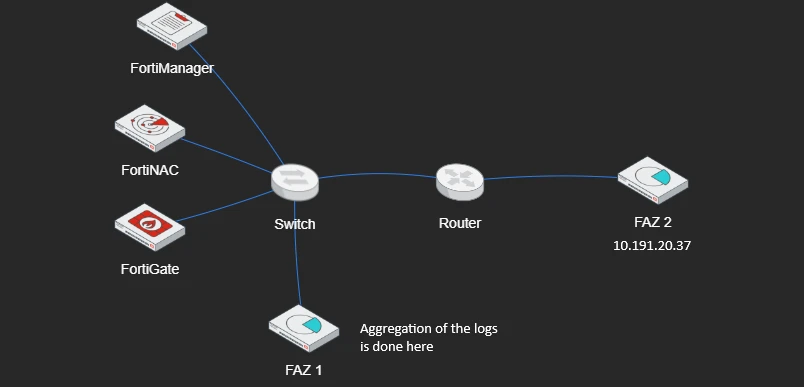
In this scenario, there is one FortiAnalyzer (FAZ 1) which collects the logs from different devices and then sends the aggregated logs daily at required interval to the other FortiAnalyzer (FAZ 2).


faztofaz.png


Log Forwarding in Aggregation mode is supported only between two FortiAnalyzers. 


  • FAZ 1 configuration:


config system log-forward
    edit 1
        set mode aggregation
        set server-name FAZ_2
        set server-addr 10.100.4.37
        set agg-user admin          <----- User and Password to access the server.
        set agg-password fortidemo
        set agg-time 11             <----- Time when logs will be forwarded daily.
    next
end


  • FAZ 2 configuration:


config system log-forward-service

    set accept-aggregation enable   <----- Enable the aggregation service.
end


  • Test the configuration by initiating an immediate upload to the server with command 'execute log-aggregation <id>' as below:


FAZ_1 # execute log-aggregation  ?
Client ID        Server Name/IP
================ ====================
all
1                 FAZ_2


FAZ_1 # execute log-aggregation 1

FAZ_1 #


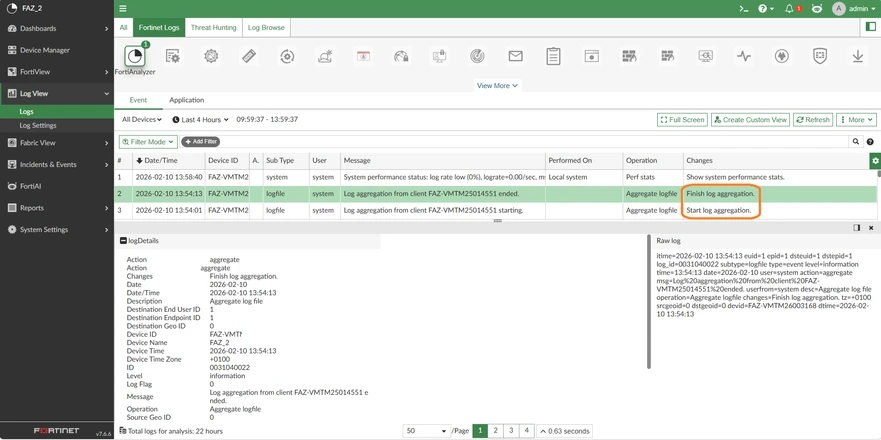
  • Confirm the aggregation works by checking the logs on the FAZ 2 GUI under Log View -> Logs.


confirm.png

Risk and Resilience in the Age of AI. An OT Thought Leadership Summit for Houston's Critical Infrastructure Leaders. Date: Thursday, December 3, 2026. Time: 8:30 am - 1:30 pm (CT). Location: The Westin Houston, Memorial City | 945 Gessner Road, Houston, TX 77024